> ## Documentation Index
> Fetch the complete documentation index at: https://help.csvbox.io/llms.txt
> Use this file to discover all available pages before exploring further.
# Import Links
> Share a no-code import link to accept spreadsheet files from your users without a website or an app.
Import Links let you accept files from your users without a website or an app. Create an import page in a few clicks and share the link with your users, with no code required. It's an alternative to the import button that you set up by adding the integration code.
## Find the import link
After you create a sheet, go to the **Code** tab on the **Edit Sheet** page. The sheet's import link appears below the integration code. It looks like this:
```javascript theme={null}
https://app.csvbox.io/upload/2gzJa5YO3QPLYK6Bj7Qmq5bpbFqXno?user_id=default123
```
Share this link with your users to start collecting spreadsheets.
## Referencing the user in the import links
Configure the query parameters in the link to identify users and match them with their imports. Add up to 5 query parameters with custom user attributes that identify the users in your platform. The custom user attributes are pushed to your destination along with the uploaded data.
`user_id` is the only mandatory custom attribute. Apart from `user_id`, you can add up to 4 custom attributes in the `&key=value` format. For example:
```javascript theme={null}
https://app.csvbox.io/upload/2gzJa5YO3QPLYK6Bj7Qmq5bpbFqXno?user_id=1a2b3c4d5e6f&team_id=sales2&isAuthenticated=true&permissionLevel=admin&email=abc@example.com
```
## Activating import links
Activate or deactivate import links in the sheet settings: go to the **Sheet Edit** page → **Options** tab → **Import Links**, and select **Activate** or **Deactivate** in the dropdown.
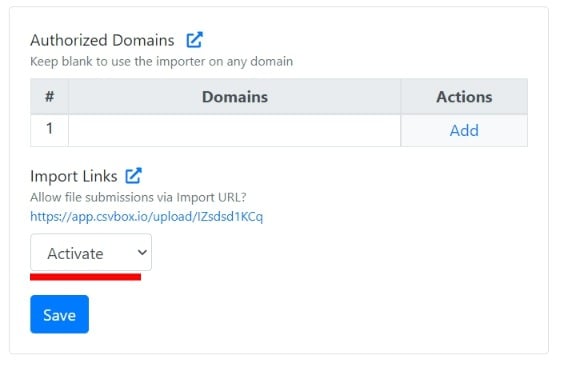 If import links are deactivated, users see a **File imports disabled** message instead of the importer.
This documentation is built and hosted on [Mintlify](https://mintlify.com), a developer documentation platform.
If import links are deactivated, users see a **File imports disabled** message instead of the importer.
This documentation is built and hosted on [Mintlify](https://mintlify.com), a developer documentation platform.