> ## Documentation Index
> Fetch the complete documentation index at: https://help.csvbox.io/llms.txt
> Use this file to discover all available pages before exploring further.
# Changelog
> A record of all notable changes made to the application.
This page lists notable CSVbox releases, newest first. Each entry links to the documentation for the feature it adds or changes.
### Checkbox display for Boolean columns
**Added**: [Display as checkbox](/dashboard-settings/validations#display-as-checkbox) for Boolean columns. Turn on **Display as checkbox** for a Boolean column to show a checkbox in each cell on the Verify Data screen. Every value is converted to `true` or `false` before it is sent to your destination, so the column never shows a validation error. Also available in the Sheet API as `render_as_checkbox`.
### Sheet Tags
**Added**: [Sheet Tags](/dashboard-settings/sheet-tags). Attach color-coded tags to your sheets to group them, and filter the Sheets page by one or more tags. Add tags with **+ Tag** on any sheet, and manage them from the **Tags** page. Tags are kept per account and are not copied when a sheet is copied to another team or account.
### Smart date and number formats
**Added**: [Smart Date and Number Formats](/dashboard-settings/smart-date-and-number-formats). CSVbox now converts dates and numbers written in different regional formats into the format your column expects, and asks the user once when a value such as `04/05/2024` or `1,234` could be read two ways. Turn it on with **Date correction?** under **Import Steps** → **Verify Data**.
### If / Else Builder
**Added**: [If / Else Builder](/advanced-installation/if-else-builder). Build Validation Functions and Data Transforms visually with IF / ELSE IF / ELSE rules, without writing JavaScript.
### MCP server
**Added**: CSVbox now ships an MCP server. Configure importers by prompting Claude, Cursor, or any MCP client instead of hand-writing schema JSON.
### Importer GET APIs
**Added**: GET APIs to retrieve a list of importers and view the complete configuration of a specific importer, with sensitive credentials excluded.
### 11 new column types
**Added**: 11 new column types give you more options for validating and normalizing imported data, including **Percentage, IANA Timezone, UPC, EAN, UUID, Domain, Currency Code, Country Code A2, Country Code A3, IMEI, and JSON**.
### Files with up to 2M rows
**Added**: CSVbox can now handle files with **up to 2M rows**, making it easier to import and process high-volume datasets without splitting them into smaller batches.
### Spreadsheet review table enhancements
**Added**: Column sorting (3-state cycle with numeric-aware ordering), advanced filtering (value/condition operators with multi-column logic), right-click context menus for cells/columns/rows, and full undo/redo support (up to 50 steps).
### Sorting in the upload table
**Added**: Sorting support in the upload table. Table rendering was reworked to handle sorted views correctly.
### AI sheet generation
**Added**: A new AI-powered feature that lets you **generate a CSVbox sheet and define its columns** simply by describing your requirements.
### Column logic via Sheet API
**Added**: Create, update, and manage Validation Functions, Virtual Columns, and Data Transforms via the Sheet API.
### PDF metadata extraction
**Added**: Automatically extract metadata fields from uploaded PDF documents.
### Bulk AI Transform
**Added**: Run AI-powered transformations across your data in bulk with a single click.
### Trim whitespace for List columns
**Updated**: Trim-whitespace support now works on list-type columns, including dynamic columns.
### Improved table and header detection
**Updated**: Enhanced OCR header matching, more reliable table merging, and improved text wrapping for wide columns.
### Cleaner upload view
**Updated**: Refreshed the upload modal UI with truncated long column names and tooltips for better readability.
### Neon destination
**Added**: [Neon](https://neon.tech) as a data destination. Push imported data directly to Neon serverless Postgres databases, with built-in credentials management and connection handling.
### OpenAPI destination
**Added**: [OpenAPI](/destinations/openapi) specification support as an upload destination type. Point CSVbox to an OpenAPI/Swagger spec URL and it automatically routes import data to your API endpoints.
### Secret key for Sheet API authorization
**Added**: Secret key + API key combination for Sheet API authorization, adding an extra layer of security for embedding and API access.
### REST API auto mapping priority
**Improved**: REST API `auto_map` now matches columns using the same priority order as the frontend importer: `display_label` first, then `column_name`, then matching keywords.
### Make, Pabbly, and IFTTT integrations
**Added**:
* CSVbox as an in-app integration in [Make](https://make.com).
* CSVbox as an app in [Pabbly](https://www.pabbly.com).
* CSVbox as an app in [IFTTT](https://ifttt.com).
### Xero destination
**Added**: [Xero](https://www.xero.com/) as a data destination. Automatically push imported data to Xero with secure authentication and simplified connection setup.
### Sheets API
**New**: [Sheets API](/advanced-installation/sheet-api). You can now create and manage importer sheets programmatically instead of only through the dashboard.
### AI Function Generator
**New**: [AI Function Generator](/dashboard-settings/ai-function-generator). Generate validation functions, virtual columns, data transforms, and regex patterns using plain-language prompts. Describe what you want, and CSVbox generates compatible JavaScript or regex logic automatically.
### Split large CSV file imports
**New**: [Split Large CSV File Imports](/dashboard-settings/split-large-csv). CSVbox can now automatically split large CSV files into smaller parts during import for improved reliability and browser performance. Multipart uploads reuse the same column mappings across all parts and are grouped together in the Imports dashboard for easier tracking.
### AI document import
**New**: [AI Document Import](/dashboard-settings/ai-document-import) (PDFs, Images & DOCX). You can now import data from PDFs, images, and documents using AI-powered table extraction.
### Import Analytics
**Added**: [Import Analytics](/dashboard-settings/import-analytics). Get visibility into your import flow with built-in analytics. Track each step, from file upload and header selection to mapping, validation, and final submission. Identify drop-offs, measure completion rates, and uncover top errors so you can improve onboarding and reduce failed imports. Available for Pro plans and higher.
### Column errors in server-side validation
**New**: [Server-Side Validation](/advanced-installation/server-side-validation) supports the **column** error type.
### Sheet import and export
**Added**: Sheet import and export functionality. You can now export sheets from one CSVbox account and import them into another (or duplicate within the same account).
* Securely copy sheets using a Sheet License Key and Export Key
* Entire sheet configuration is duplicated automatically
* Imported sheets receive a new unique license key
* Perfect for staging → production workflows and template reuse
* More information [here](/dashboard-settings/sheet-options-1#sheet-import--export)
### Bulk actions on the column mapping screen
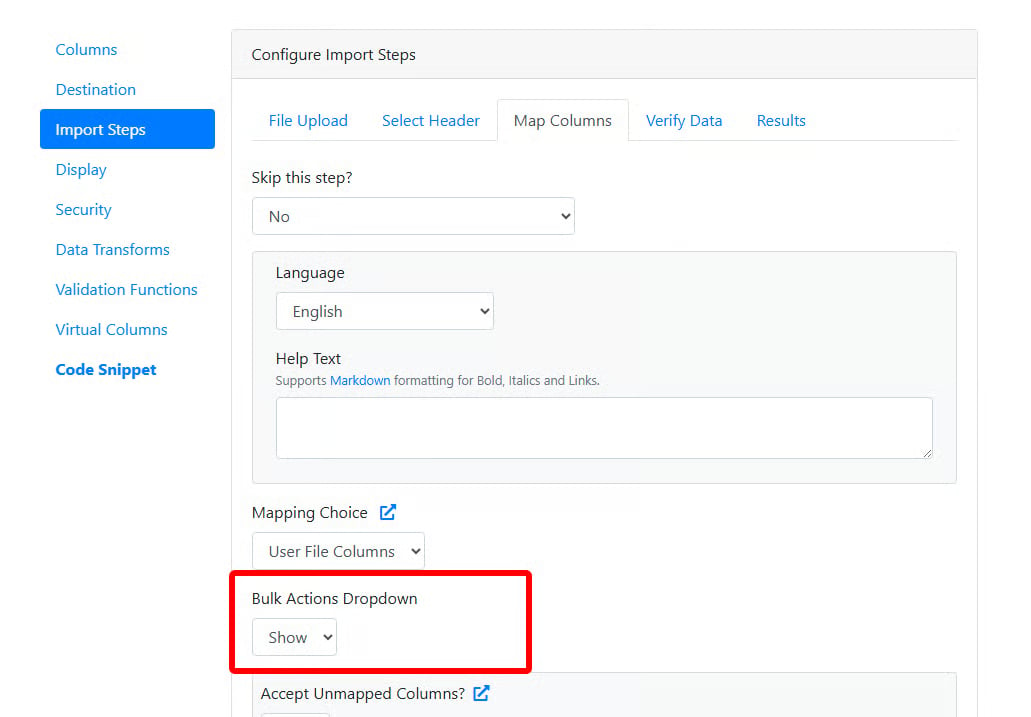
Added **Bulk Actions** to the Column Mapping screen, allowing users to reset all mappings or mark all columns as ignored in a single action.
 ### AI-powered auto column mapping
Introduced **AI-powered auto column mapping** within Bulk Actions to automatically map file columns to template fields.
### Download and reuse importer styling
**Added**: Custom styling Download and Upload functionality. You can now download your customized importer styling as a CSS file and upload it to another importer to instantly apply the same design. Perfect for maintaining consistent branding across multiple sheets, with no re-styling required. More info [here](/sheet-settings/display#download--reuse-importer-styling-css).
### Import metadata in the admin dashboard
**Updated**: The Import screen in the admin dashboard now displays additional metadata for individual imports.
### Environment variable encryption options
**Added**: Support for AES-256-GCM and improved AES-CBC (V2) encryption options in Environment Variables for enhanced data security. More information [here](/advanced-installation/environment-variables#encrypting-environment-variables).
### UI enhancements
Made several small UI tweaks to make the importer sleeker and more user-friendly. For example, the row filter dropdown (All / Error rows) is now a modern toggle switch, and the search box has been condensed into a search icon that expands on click.
### Pipedream, n8n, and Softr destinations
**Added**:
* [Pipedream](/destinations/pipedream) as a data destination.
* [n8n](/destinations/n8n) as a data destination.
* [Softr](/destinations/softr) as a data destination.
### Improved list selection
**Improved**: We've added a new **Replace all similar cells** button for **List-type columns**. This allows you to replace **all cells with the same value as the currently selected cell** in one click. Perfect for quickly fixing repeated invalid values and speeding up data verification.
### Quick actions for validation errors
**Added**: You can now take faster action on validation errors using the new **Quick Actions** button in the message bar. This provides one-click options to delete all invalid values, replace empty cells, or find and replace values, making it quicker to fix errors without navigating through individual cells.
### New languages
**Added**: Newly supported languages include:
* Bulgarian (`bg`)
* Czech (`cs`)
* Hungarian (`hu`)
* Ukrainian (`uk`)
### Supabase destination
**Added**: [Supabase](/destinations/supabase) as a data destination.
### Chinese languages
Newly supported languages include:
* Chinese (Simplified) - `zh-CN`
* Chinese (Traditional) - `zh-TW`
### Hide Cancel button
**Added**: **Hide Cancel Button** option to hide the Cancel button located at the bottom-right corner of the importer. More information [here](/dashboard-settings/sheet-options-1#hide-cancel-button).
### Server-side validation attributes in the client data
**Added**: New client-side attributes (`ssv_enabled`, `ssv_fail`, `ssv_row_fail`, `ssv_table_error`) are now included in the response object when Server-Side Validation is enabled. More information [here](/advanced-installation/server-side-validation#additional-attributes-in-the-client-data-object).
### Google BigQuery destination
**Added**: [Google BigQuery](/destinations/google-bigquery) as a data destination.
### Execution time for Data Transforms
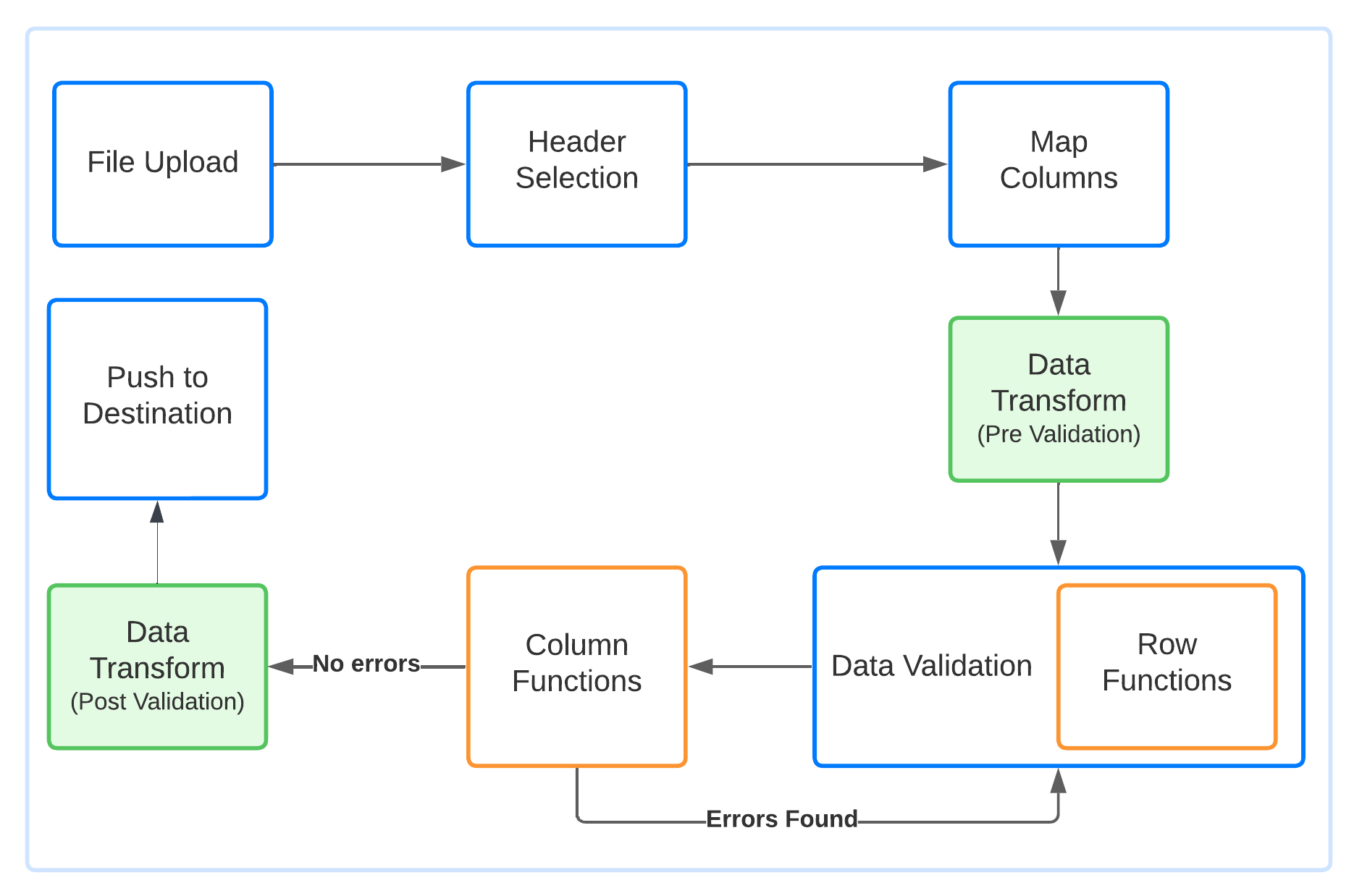
**Added**: [Execution Time](/sheet-settings/data-transforms#execution-time) option to Data Transforms. You can now choose to run each transform **before** or **after** the Data Validation stage.
### AI-powered auto column mapping
Introduced **AI-powered auto column mapping** within Bulk Actions to automatically map file columns to template fields.
### Download and reuse importer styling
**Added**: Custom styling Download and Upload functionality. You can now download your customized importer styling as a CSS file and upload it to another importer to instantly apply the same design. Perfect for maintaining consistent branding across multiple sheets, with no re-styling required. More info [here](/sheet-settings/display#download--reuse-importer-styling-css).
### Import metadata in the admin dashboard
**Updated**: The Import screen in the admin dashboard now displays additional metadata for individual imports.
### Environment variable encryption options
**Added**: Support for AES-256-GCM and improved AES-CBC (V2) encryption options in Environment Variables for enhanced data security. More information [here](/advanced-installation/environment-variables#encrypting-environment-variables).
### UI enhancements
Made several small UI tweaks to make the importer sleeker and more user-friendly. For example, the row filter dropdown (All / Error rows) is now a modern toggle switch, and the search box has been condensed into a search icon that expands on click.
### Pipedream, n8n, and Softr destinations
**Added**:
* [Pipedream](/destinations/pipedream) as a data destination.
* [n8n](/destinations/n8n) as a data destination.
* [Softr](/destinations/softr) as a data destination.
### Improved list selection
**Improved**: We've added a new **Replace all similar cells** button for **List-type columns**. This allows you to replace **all cells with the same value as the currently selected cell** in one click. Perfect for quickly fixing repeated invalid values and speeding up data verification.
### Quick actions for validation errors
**Added**: You can now take faster action on validation errors using the new **Quick Actions** button in the message bar. This provides one-click options to delete all invalid values, replace empty cells, or find and replace values, making it quicker to fix errors without navigating through individual cells.
### New languages
**Added**: Newly supported languages include:
* Bulgarian (`bg`)
* Czech (`cs`)
* Hungarian (`hu`)
* Ukrainian (`uk`)
### Supabase destination
**Added**: [Supabase](/destinations/supabase) as a data destination.
### Chinese languages
Newly supported languages include:
* Chinese (Simplified) - `zh-CN`
* Chinese (Traditional) - `zh-TW`
### Hide Cancel button
**Added**: **Hide Cancel Button** option to hide the Cancel button located at the bottom-right corner of the importer. More information [here](/dashboard-settings/sheet-options-1#hide-cancel-button).
### Server-side validation attributes in the client data
**Added**: New client-side attributes (`ssv_enabled`, `ssv_fail`, `ssv_row_fail`, `ssv_table_error`) are now included in the response object when Server-Side Validation is enabled. More information [here](/advanced-installation/server-side-validation#additional-attributes-in-the-client-data-object).
### Google BigQuery destination
**Added**: [Google BigQuery](/destinations/google-bigquery) as a data destination.
### Execution time for Data Transforms
**Added**: [Execution Time](/sheet-settings/data-transforms#execution-time) option to Data Transforms. You can now choose to run each transform **before** or **after** the Data Validation stage.
 ### Accepted file types
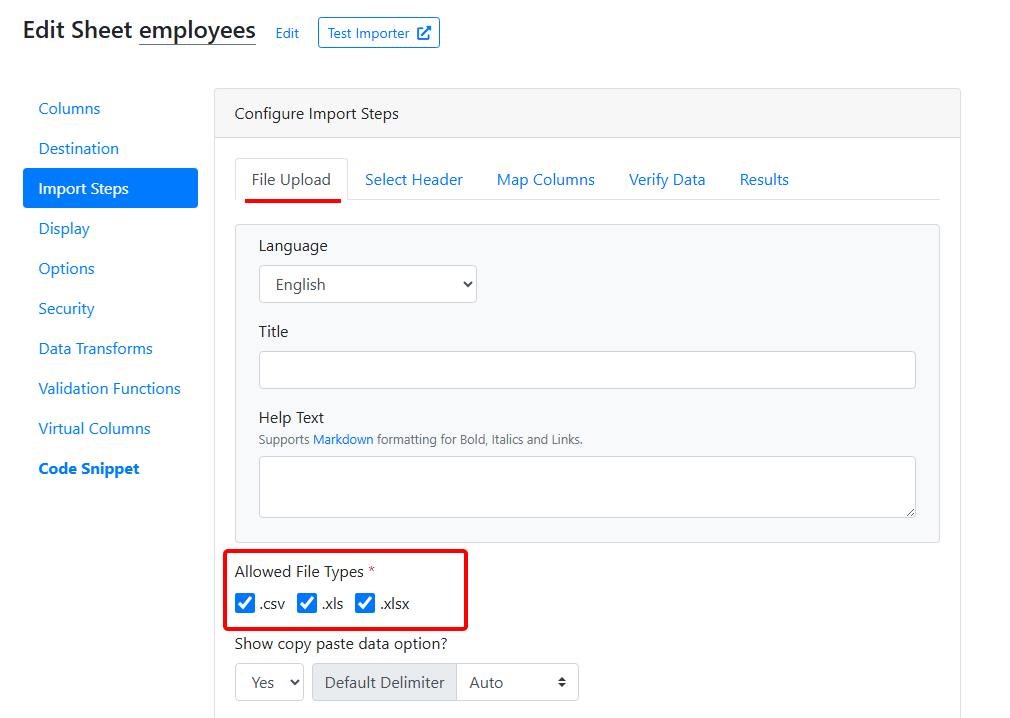
Added a new feature allowing users to select accepted file types for uploads. Choose between **CSV**, **XLS**, and **XLSX** formats in your sheet settings.
### Accepted file types
Added a new feature allowing users to select accepted file types for uploads. Choose between **CSV**, **XLS**, and **XLSX** formats in your sheet settings.
 ### Language support
**Added**: We've expanded CSVbox's multilingual capabilities. Newly supported languages include:
* Hindi (`hi`)
* Bahasa Malaysia (Malay) (`ms`)
* Russian (`ru`)
* Vietnamese (`vi`)
* Korean (`ko`)
* Bahasa Indonesia (`id`)
* Egyptian Arabic (`ar-EG`)
* Urdu (`ur`)
### Table and row errors in server-side validation
**New**: [Server-Side Validation](/advanced-installation/server-side-validation) supports **table** and **row** error types.
**UX**: Table errors render in an alert banner above the grid. Row errors appear as a badge on the row number with a pop-over on click.
**API**: You can mix `table`, `row`, and `cell` errors in one response. `type` is optional and defaults to `cell`. **No breaking changes.**
### Default header row
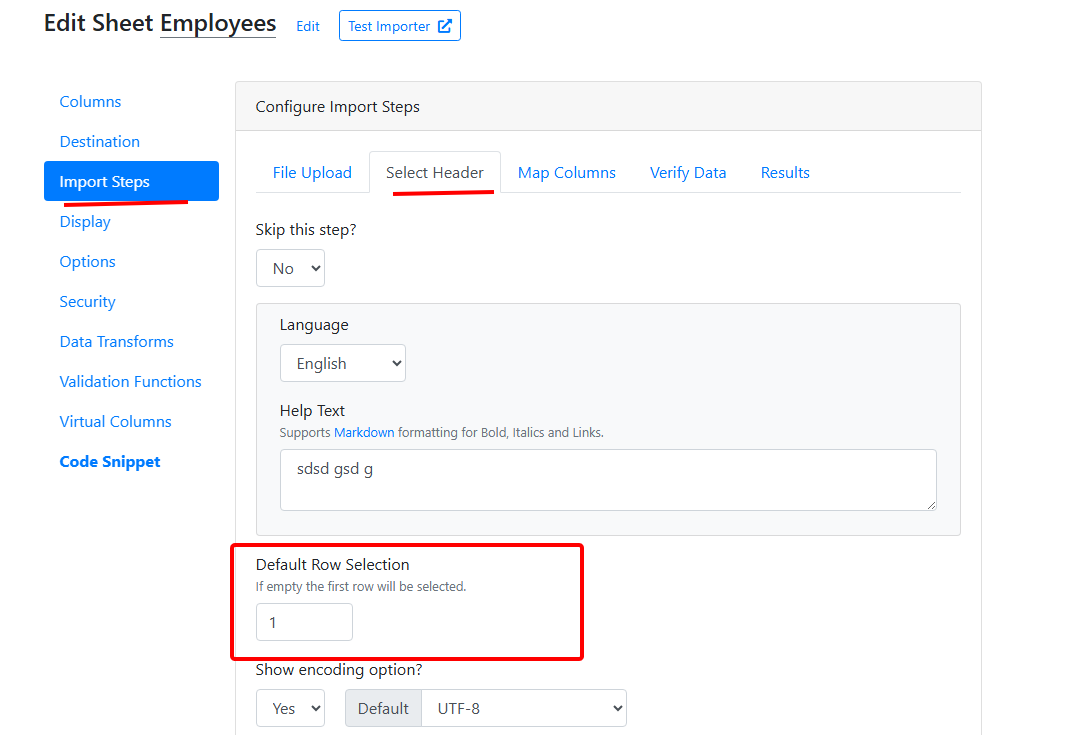
Added an option to set the default row on the header selection screen. You can now choose which row is pre-selected on the Header Selection step.
Also available as an installation parameter: [`default_header_row`](/getting-started/2-install-code#default_header_row).
### Language support
**Added**: We've expanded CSVbox's multilingual capabilities. Newly supported languages include:
* Hindi (`hi`)
* Bahasa Malaysia (Malay) (`ms`)
* Russian (`ru`)
* Vietnamese (`vi`)
* Korean (`ko`)
* Bahasa Indonesia (`id`)
* Egyptian Arabic (`ar-EG`)
* Urdu (`ur`)
### Table and row errors in server-side validation
**New**: [Server-Side Validation](/advanced-installation/server-side-validation) supports **table** and **row** error types.
**UX**: Table errors render in an alert banner above the grid. Row errors appear as a badge on the row number with a pop-over on click.
**API**: You can mix `table`, `row`, and `cell` errors in one response. `type` is optional and defaults to `cell`. **No breaking changes.**
### Default header row
Added an option to set the default row on the header selection screen. You can now choose which row is pre-selected on the Header Selection step.
Also available as an installation parameter: [`default_header_row`](/getting-started/2-install-code#default_header_row).
 ### Test API destination
Added [**Test API**](/destinations#test-api) destination. It sends spreadsheet data to a unique [`webhooks.csvbox.io`](https://webhooks.csvbox.io/) URL (testing-only).
### Custom error messages for regex dynamic columns
Added support for custom error messages (via `error_message` validator) for [regex type dynamic columns](/advanced-installation/dynamic-columns#validator-options).
### Excel values for number dynamic columns
You can now use the `excel_value` validator with number-type dynamic columns to control whether to import **raw** or **formatted** values from Excel.
### Environment variable support for APIs
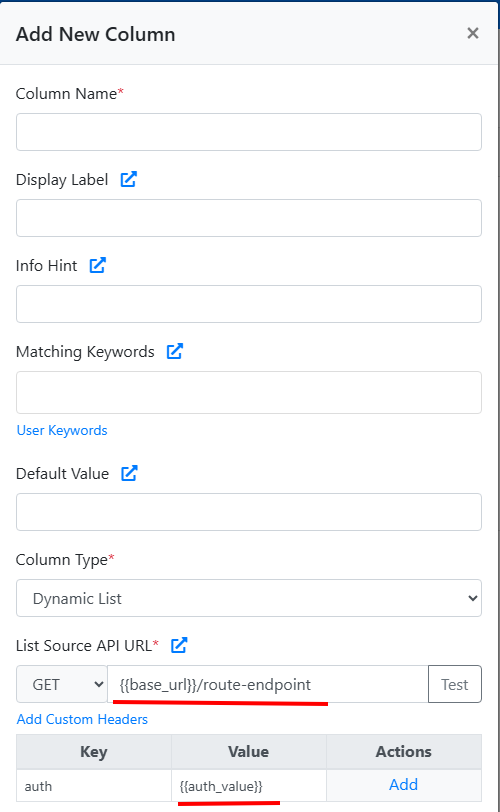
You can now use environment variables in:
1. Dynamic List API
2. Multi-select Dynamic List API
3. Success Message API
4. Failed Message API
5. Custom headers for all the above
This makes it easier to manage configuration across environments.
### Test API destination
Added [**Test API**](/destinations#test-api) destination. It sends spreadsheet data to a unique [`webhooks.csvbox.io`](https://webhooks.csvbox.io/) URL (testing-only).
### Custom error messages for regex dynamic columns
Added support for custom error messages (via `error_message` validator) for [regex type dynamic columns](/advanced-installation/dynamic-columns#validator-options).
### Excel values for number dynamic columns
You can now use the `excel_value` validator with number-type dynamic columns to control whether to import **raw** or **formatted** values from Excel.
### Environment variable support for APIs
You can now use environment variables in:
1. Dynamic List API
2. Multi-select Dynamic List API
3. Success Message API
4. Failed Message API
5. Custom headers for all the above
This makes it easier to manage configuration across environments.
 ### Dark themes
The importer now supports **dark** and **custom dark** themes for a better user experience.
### Theme installation option
Added a [`theme`](/getting-started/2-install-code#theme) selection option in the installation code for applying the theme at runtime.
### Excel value formatting options
Added **Excel Value Formatting Options**. Choose how numeric values are imported:
* **Formatted**: As shown in Excel (e.g., "\$1,200.00", "15%").
* **RAW**: Strips formatting for clean numbers (e.g., 1200, 0.15).
Ideal for better control in calculations and validations. More info [here](/dashboard-settings/validations#number).
### MongoDB destination
Added MongoDB as a data destination.
### AI bulk transformations
Introduced **AI Bulk Transformations**, allowing users to apply AI-driven changes to uploaded data using natural language prompts, all directly in the importer. Supports multi-language input, column-level modifications, and ensures complete privacy with no external data sharing. More information [here](/dashboard-settings/ai-bulk-transforms).
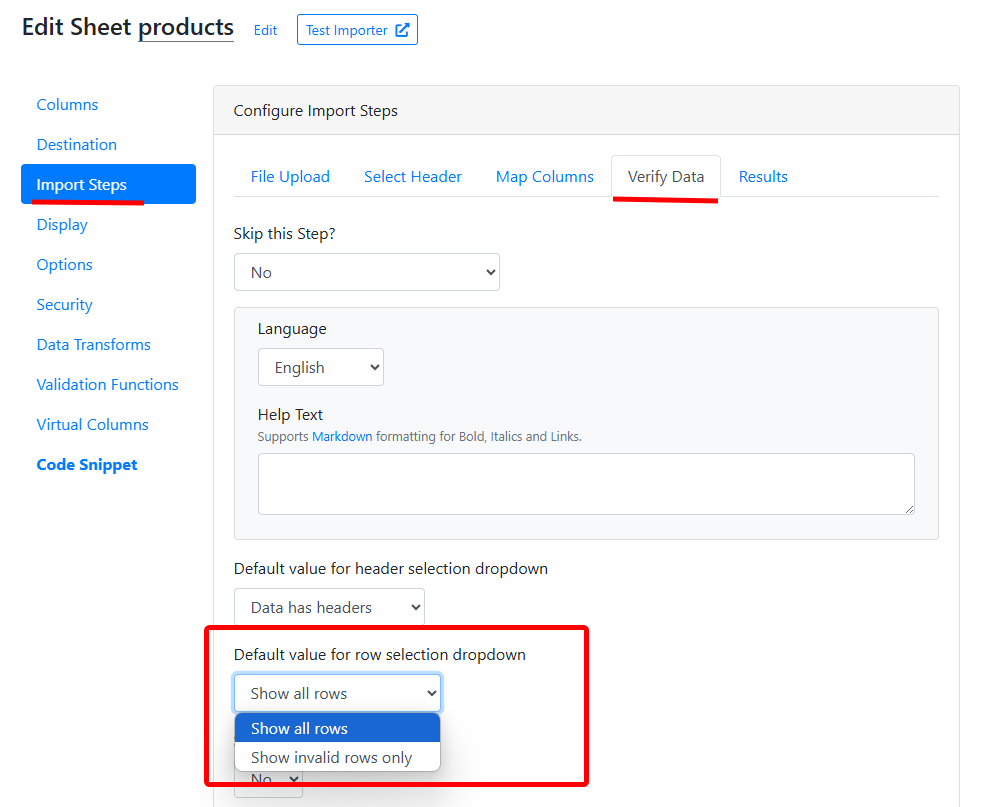
### Default table view
Introduced a setting to choose the default table view on the Verify Data screen. Users can now select between "Show all rows" and "Show invalid rows only."
### Dark themes
The importer now supports **dark** and **custom dark** themes for a better user experience.
### Theme installation option
Added a [`theme`](/getting-started/2-install-code#theme) selection option in the installation code for applying the theme at runtime.
### Excel value formatting options
Added **Excel Value Formatting Options**. Choose how numeric values are imported:
* **Formatted**: As shown in Excel (e.g., "\$1,200.00", "15%").
* **RAW**: Strips formatting for clean numbers (e.g., 1200, 0.15).
Ideal for better control in calculations and validations. More info [here](/dashboard-settings/validations#number).
### MongoDB destination
Added MongoDB as a data destination.
### AI bulk transformations
Introduced **AI Bulk Transformations**, allowing users to apply AI-driven changes to uploaded data using natural language prompts, all directly in the importer. Supports multi-language input, column-level modifications, and ensures complete privacy with no external data sharing. More information [here](/dashboard-settings/ai-bulk-transforms).
### Default table view
Introduced a setting to choose the default table view on the Verify Data screen. Users can now select between "Show all rows" and "Show invalid rows only."
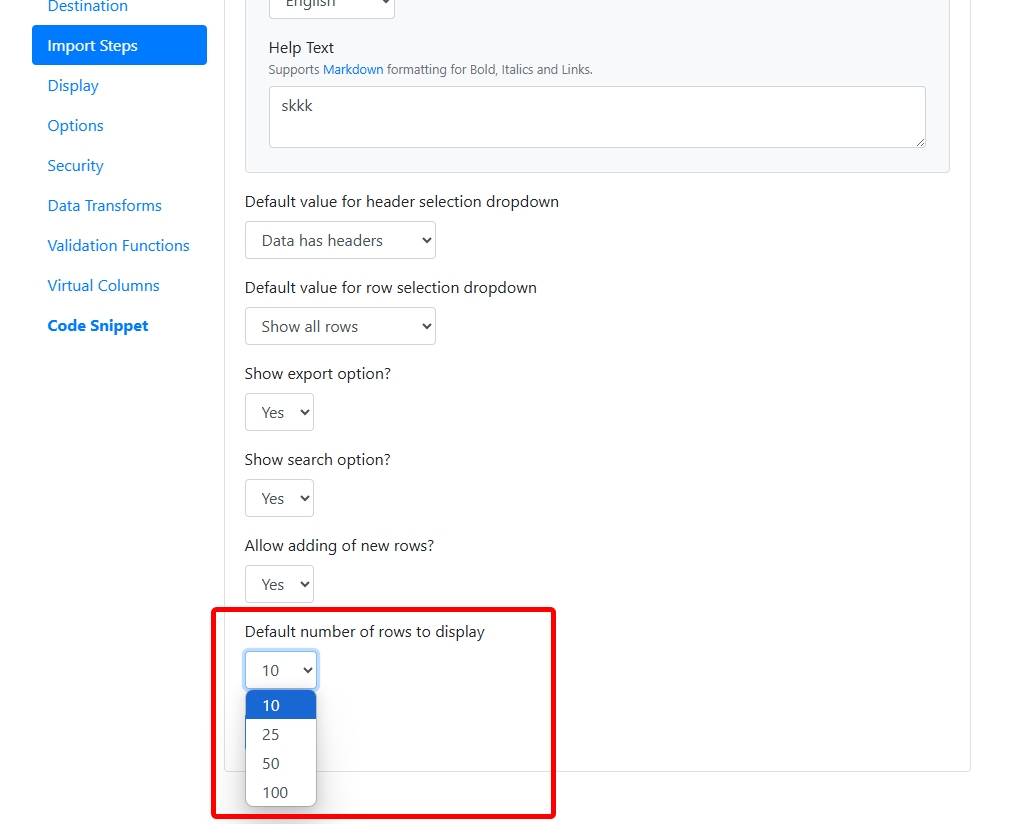
 ### Default number of rows
Added a configuration option to set the default number of rows displayed on the Verify Data screen.
### Default number of rows
Added a configuration option to set the default number of rows displayed on the Verify Data screen.
 ### Unmapped column property
**Introduced the `column.isUnmapped` property** in the [`csvbox.columns`](/sheet-settings/data-transforms#csvboxcolumns) object to identify Unmapped Columns. This is now available in Data Transforms and Validation Functions.
### Unmapped columns in server-side validation
Added support for Unmapped Columns in Server-Side Validation, allowing validation errors to be shown for Unmapped Columns.
### Add columns via CSV
Added support for bulk adding columns using a sample CSV file. More info [here](/dashboard-settings/add-columns-via-csv).
### Dynamic column property
**Introduced the `column.isDynamic` property** in the [`csvbox.columns`](/sheet-settings/data-transforms#csvboxcolumns) object to identify Dynamic Columns. This is now available in Data Transforms and Validation Functions.
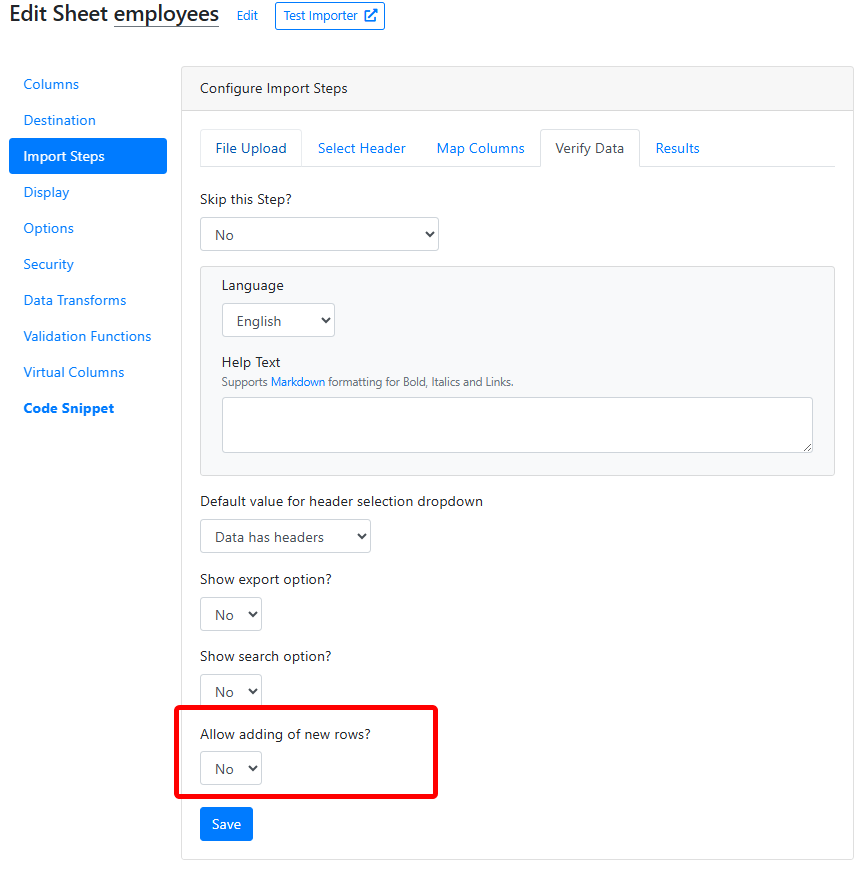
### Restrict adding rows
Introduced a new configuration option to restrict adding new rows on the Verify Data screen.
### Unmapped column property
**Introduced the `column.isUnmapped` property** in the [`csvbox.columns`](/sheet-settings/data-transforms#csvboxcolumns) object to identify Unmapped Columns. This is now available in Data Transforms and Validation Functions.
### Unmapped columns in server-side validation
Added support for Unmapped Columns in Server-Side Validation, allowing validation errors to be shown for Unmapped Columns.
### Add columns via CSV
Added support for bulk adding columns using a sample CSV file. More info [here](/dashboard-settings/add-columns-via-csv).
### Dynamic column property
**Introduced the `column.isDynamic` property** in the [`csvbox.columns`](/sheet-settings/data-transforms#csvboxcolumns) object to identify Dynamic Columns. This is now available in Data Transforms and Validation Functions.
### Restrict adding rows
Introduced a new configuration option to restrict adding new rows on the Verify Data screen.
 ### OpenAI added as a subprocessor
Added OpenAI to the list of [subprocessors](/legal/gdpr/data-processing-addendum#sub-processors) in the [DPA](/legal/gdpr/data-processing-addendum).
**Why is OpenAI added as a subprocessor?** CSVbox leverages OpenAI's industry-leading AI capabilities to enhance functionality within the importer app. As we build new AI-powered features, OpenAI has been included as a subprocessor.
### Zero template columns
Added support for file submissions without requiring predefined template columns. Check out [Zero Template Column](/dashboard-settings/sheet-options-1#zero-template-columns) functionality.
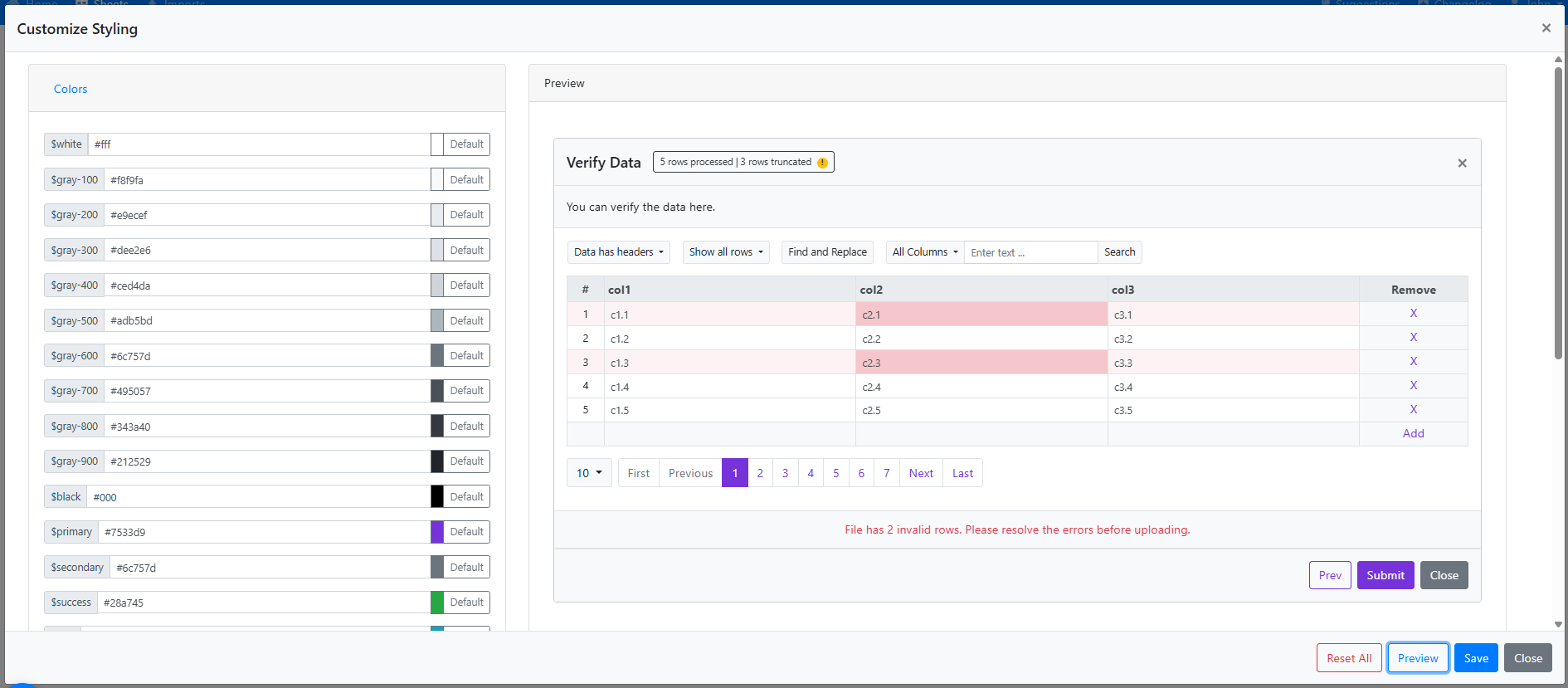
### Expanded styling options
Expanded styling options with customizable colors, fonts, and layout sizes, allowing for a more consistent and professional appearance.
### OpenAI added as a subprocessor
Added OpenAI to the list of [subprocessors](/legal/gdpr/data-processing-addendum#sub-processors) in the [DPA](/legal/gdpr/data-processing-addendum).
**Why is OpenAI added as a subprocessor?** CSVbox leverages OpenAI's industry-leading AI capabilities to enhance functionality within the importer app. As we build new AI-powered features, OpenAI has been included as a subprocessor.
### Zero template columns
Added support for file submissions without requiring predefined template columns. Check out [Zero Template Column](/dashboard-settings/sheet-options-1#zero-template-columns) functionality.
### Expanded styling options
Expanded styling options with customizable colors, fonts, and layout sizes, allowing for a more consistent and professional appearance.
 ### Mapping choices
Added [Mapping Choices](/dashboard-settings/sheet-options-1#mapping-choice), an option for customers to map file columns to template fields or template fields to file columns.
### Environment variables in column logic
Support for [Environment Variables](/advanced-installation/environment-variables) is now available in [Validation Functions](/sheet-settings/validation-functions#csvboxenvironment), [Data Transforms](/sheet-settings/data-transforms#csvboxenvironment), and [Virtual Columns](/sheet-settings/virtual-columns#csvboxenvironment).
### File delete policy moved to sheet settings
Relocated the [File Delete Policy](/dashboard-settings/sheet-options-1#file-delete-policy) from account-level settings to sheet-level settings.
### Columns object
Introduced the [`csvbox.columns`](/sheet-settings/data-transforms#csvboxcolumns) object for use in Data Transforms and Validation Functions.
### Auto mapping in the REST File API
Added the [`auto_map`](/advanced-installation/rest-file-api#request-body) attribute to the REST File API to activate automatic column mapping during file submission.
### Faster imports
Optimized the code to improve import performance 2x.
### Data Transforms
Introduced Data Transforms, enabling a new method for bulk editing datasets before pushing them to your app. Learn more here: [Data Transforms Guide](/sheet-settings/data-transforms).
### Admin panel UI refresh
Refined the CSVbox admin panel UI for a more intuitive and streamlined experience.
### Hide the file upload box
Added the option to hide the File Upload Box for cases where only the Copy-Paste data option is mandatory.
### List values and display labels
For List-type columns, introduced the ability to accept **list values** interchangeably with **display labels**.
### Importer UI improvements
Introduced several UI improvements to the importer, including a confirmation prompt when closing the import process.
### Toggle Virtual Columns and Validation Functions
Added toggle functionality to enable or disable Virtual Columns and Validation Functions.
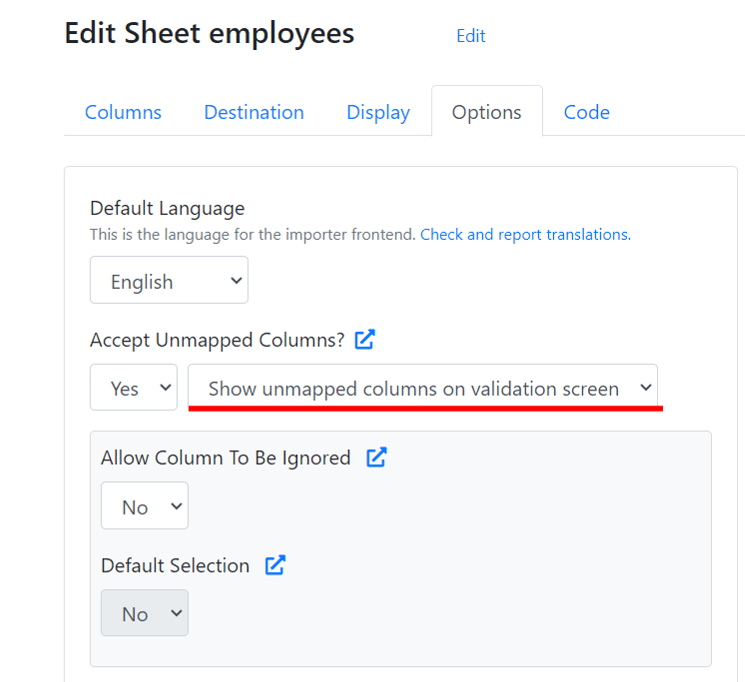
### Show unmapped columns
Added the option to show [Unmapped Columns](/sheet-settings/import-steps/map-columns) on the Validation Screen.
### Mapping choices
Added [Mapping Choices](/dashboard-settings/sheet-options-1#mapping-choice), an option for customers to map file columns to template fields or template fields to file columns.
### Environment variables in column logic
Support for [Environment Variables](/advanced-installation/environment-variables) is now available in [Validation Functions](/sheet-settings/validation-functions#csvboxenvironment), [Data Transforms](/sheet-settings/data-transforms#csvboxenvironment), and [Virtual Columns](/sheet-settings/virtual-columns#csvboxenvironment).
### File delete policy moved to sheet settings
Relocated the [File Delete Policy](/dashboard-settings/sheet-options-1#file-delete-policy) from account-level settings to sheet-level settings.
### Columns object
Introduced the [`csvbox.columns`](/sheet-settings/data-transforms#csvboxcolumns) object for use in Data Transforms and Validation Functions.
### Auto mapping in the REST File API
Added the [`auto_map`](/advanced-installation/rest-file-api#request-body) attribute to the REST File API to activate automatic column mapping during file submission.
### Faster imports
Optimized the code to improve import performance 2x.
### Data Transforms
Introduced Data Transforms, enabling a new method for bulk editing datasets before pushing them to your app. Learn more here: [Data Transforms Guide](/sheet-settings/data-transforms).
### Admin panel UI refresh
Refined the CSVbox admin panel UI for a more intuitive and streamlined experience.
### Hide the file upload box
Added the option to hide the File Upload Box for cases where only the Copy-Paste data option is mandatory.
### List values and display labels
For List-type columns, introduced the ability to accept **list values** interchangeably with **display labels**.
### Importer UI improvements
Introduced several UI improvements to the importer, including a confirmation prompt when closing the import process.
### Toggle Virtual Columns and Validation Functions
Added toggle functionality to enable or disable Virtual Columns and Validation Functions.
### Show unmapped columns
Added the option to show [Unmapped Columns](/sheet-settings/import-steps/map-columns) on the Validation Screen.
 ### Direct file upload in the REST File API
Updated the [REST File API](/advanced-installation/rest-file-api) to enable direct uploading of file contents. Check the [`import.file`](/advanced-installation/rest-file-api#direct-file-upload) body param.
### Slovak language
Added support for the Slovak language.
### Read-only columns
Added the functionality to make columns [**Read Only**](/sheet-settings/columns#read-only).
### Import description
End users can now input a file/import description before uploading the file. More info [here](/dashboard-settings/sheet-options-1#import-description).
### Turkish language
Added support for the Turkish language.
### Password-protected files
**Importer enhancement**: The importer now handles password-protected files more effectively. Users receive a message indicating that password-protected files cannot be read.
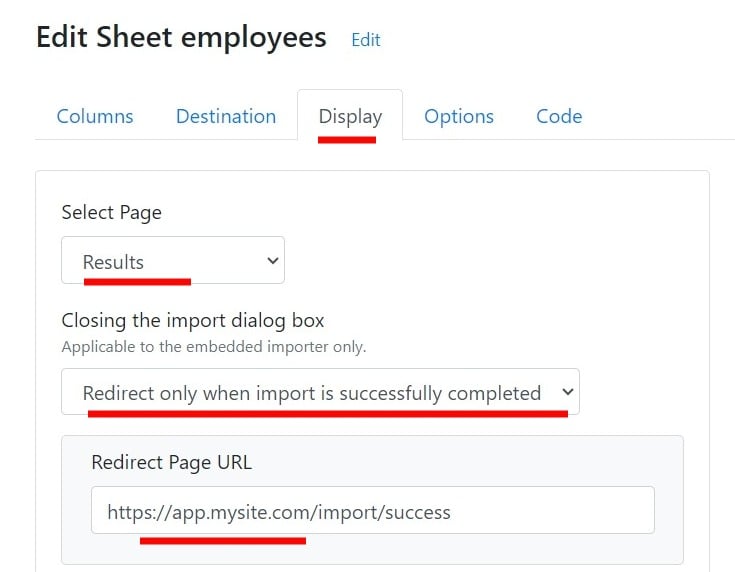
### Redirect URL
You can now provide a URL to redirect the page after the import is completed successfully.
### Direct file upload in the REST File API
Updated the [REST File API](/advanced-installation/rest-file-api) to enable direct uploading of file contents. Check the [`import.file`](/advanced-installation/rest-file-api#direct-file-upload) body param.
### Slovak language
Added support for the Slovak language.
### Read-only columns
Added the functionality to make columns [**Read Only**](/sheet-settings/columns#read-only).
### Import description
End users can now input a file/import description before uploading the file. More info [here](/dashboard-settings/sheet-options-1#import-description).
### Turkish language
Added support for the Turkish language.
### Password-protected files
**Importer enhancement**: The importer now handles password-protected files more effectively. Users receive a message indicating that password-protected files cannot be read.
### Redirect URL
You can now provide a URL to redirect the page after the import is completed successfully.
 ### Two-factor authentication
Two-Factor Authentication (2FA) is now available for all CSVbox users. This new feature is a part of our ongoing efforts to enhance security when accessing our platform.
To activate 2FA, log in to your CSVbox account → go to the **Accounts** page → click the **Enable 2-factor Authentication** button and follow the instructions.
### Pre-load the importer from a file
Added [`upload_file_url`](/getting-started/2-install-code#upload_file_url) and [`upload_file_worksheet_name`](/getting-started/2-install-code#upload_file_worksheet_name) options to pre-load the importer with data from a file.
### Encrypted environment variables
You can now encrypt environment variables using the [AES Everywhere library](https://github.com/mervick/aes-everywhere) to protect sensitive data. More info [here](/advanced-installation/environment-variables#encrypting-environment-variables).
### Accept other values in List columns
Updated the List Type Column validation to include the **Accept Other Values** option.
### Two-factor authentication
Two-Factor Authentication (2FA) is now available for all CSVbox users. This new feature is a part of our ongoing efforts to enhance security when accessing our platform.
To activate 2FA, log in to your CSVbox account → go to the **Accounts** page → click the **Enable 2-factor Authentication** button and follow the instructions.
### Pre-load the importer from a file
Added [`upload_file_url`](/getting-started/2-install-code#upload_file_url) and [`upload_file_worksheet_name`](/getting-started/2-install-code#upload_file_worksheet_name) options to pre-load the importer with data from a file.
### Encrypted environment variables
You can now encrypt environment variables using the [AES Everywhere library](https://github.com/mervick/aes-everywhere) to protect sensitive data. More info [here](/advanced-installation/environment-variables#encrypting-environment-variables).
### Accept other values in List columns
Updated the List Type Column validation to include the **Accept Other Values** option.
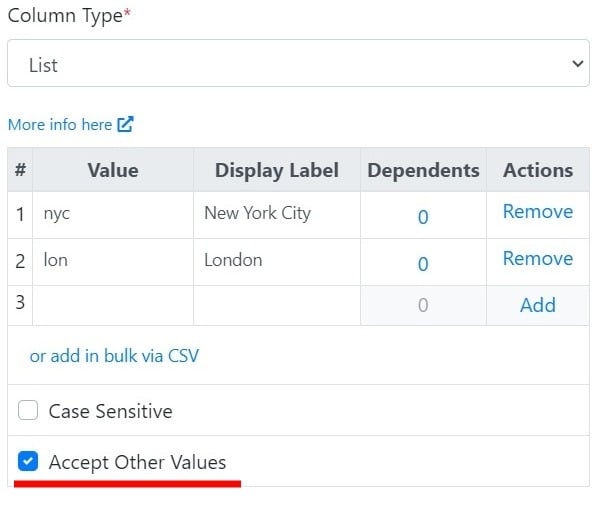 Selecting the **Accept Other Values** option allows users to input values that are not found in the predefined list of acceptable values.
This option is also available for the Dynamic List, Multi-Select List, and Dynamic Multi-Select List column types.
### Minimum rows
Added the [`min_rows`](/getting-started/2-install-code#min_rows) config option to enforce a minimum number of rows uploaded in a single sheet.
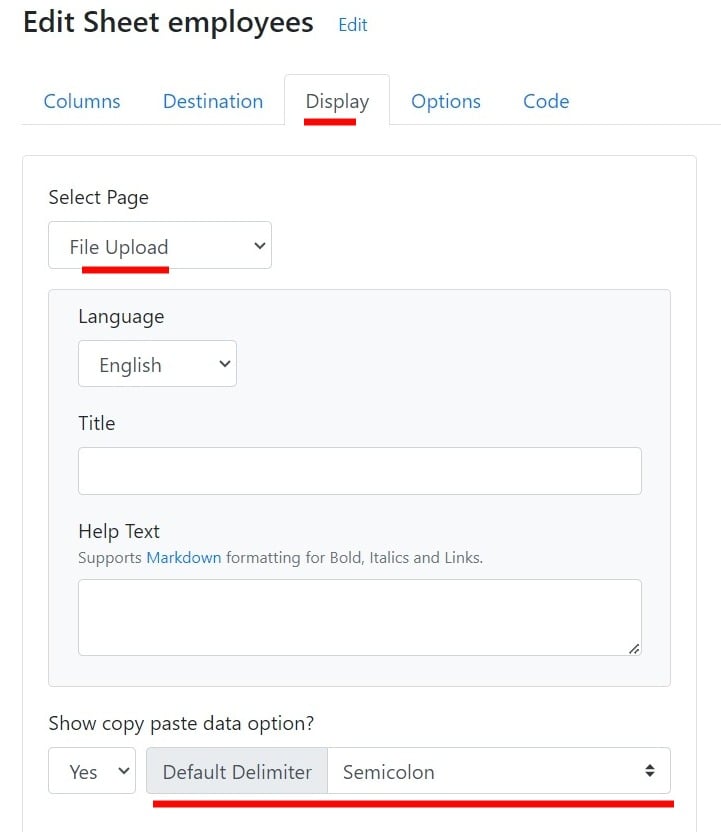
### Default delimiter for manual data entry
Added an option to configure a default delimiter for manual data entry.
Selecting the **Accept Other Values** option allows users to input values that are not found in the predefined list of acceptable values.
This option is also available for the Dynamic List, Multi-Select List, and Dynamic Multi-Select List column types.
### Minimum rows
Added the [`min_rows`](/getting-started/2-install-code#min_rows) config option to enforce a minimum number of rows uploaded in a single sheet.
### Default delimiter for manual data entry
Added an option to configure a default delimiter for manual data entry.
 ### Environment variables
You can now add [**Environment Variables**](/advanced-installation/environment-variables) to define different environments (such as 'production', 'staging', 'local') and pass dynamic values to the importer.
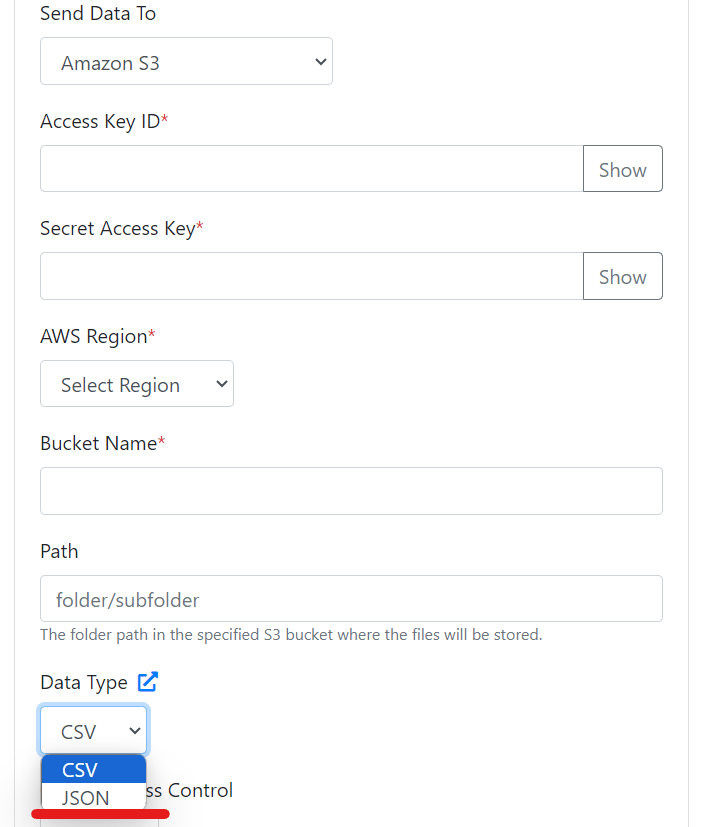
### JSON files to S3
You can now send JSON formatted files directly to S3, in addition to the CSV format files that were already sendable.
### Environment variables
You can now add [**Environment Variables**](/advanced-installation/environment-variables) to define different environments (such as 'production', 'staging', 'local') and pass dynamic values to the importer.
### JSON files to S3
You can now send JSON formatted files directly to S3, in addition to the CSV format files that were already sendable.
 ### Text search
Added search functionality to quickly find text in the uploaded sheet. It can be turned off via the admin dashboard.
### Find and replace
Added functionality to find and replace text in the uploaded data.
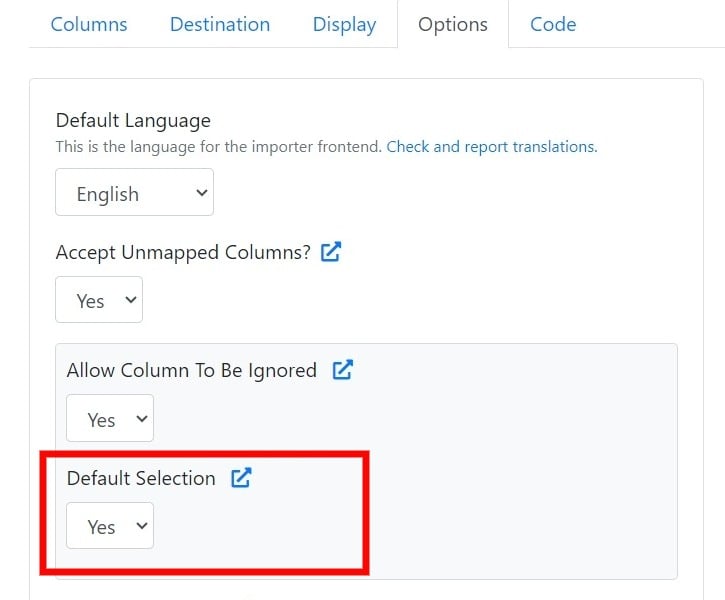
### Ignore columns by default
A new option was added to allow the default selection of columns as [Ignored Columns](/sheet-settings/import-steps/map-columns).
### Text search
Added search functionality to quickly find text in the uploaded sheet. It can be turned off via the admin dashboard.
### Find and replace
Added functionality to find and replace text in the uploaded data.
### Ignore columns by default
A new option was added to allow the default selection of columns as [Ignored Columns](/sheet-settings/import-steps/map-columns).
 ### Azure Blob Storage destination
Added Azure Blob Storage as a data destination.
### Custom file names for Google Sheets
Added Google Sheets to the [`target_file_name`](/getting-started/2-install-code#target_file_name) option. You can now provide custom file names for each new import in Google Sheets.
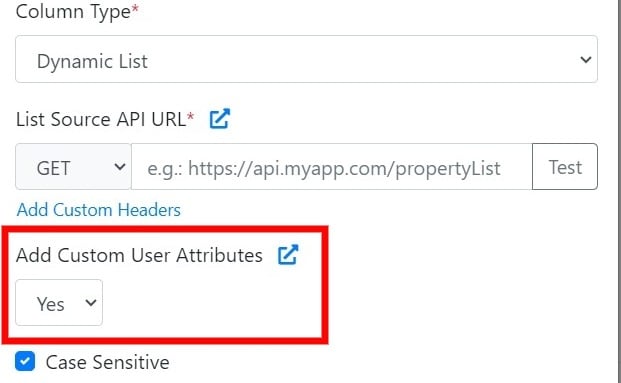
### Custom user attributes in the Dynamic List API
New option to append [custom user attributes](/getting-started/2-install-code#referencing-the-user) to the [Dynamic List API](/dashboard-settings/validations#dynamic-list). This helps to identify the user in your app and generate custom list options.
### Azure Blob Storage destination
Added Azure Blob Storage as a data destination.
### Custom file names for Google Sheets
Added Google Sheets to the [`target_file_name`](/getting-started/2-install-code#target_file_name) option. You can now provide custom file names for each new import in Google Sheets.
### Custom user attributes in the Dynamic List API
New option to append [custom user attributes](/getting-started/2-install-code#referencing-the-user) to the [Dynamic List API](/dashboard-settings/validations#dynamic-list). This helps to identify the user in your app and generate custom list options.
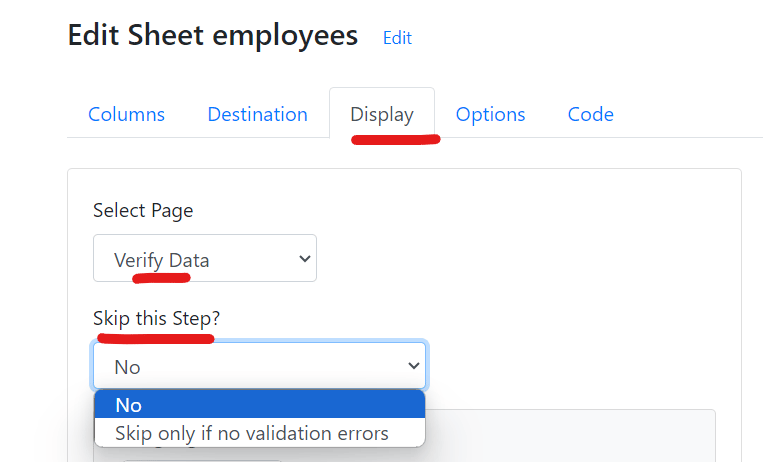
 ### Skip the data validation screen
Added an option to skip the Data Validation screen if no errors are found.
### Skip the data validation screen
Added an option to skip the Data Validation screen if no errors are found.
 ### Personal plan discontinued
The \$9 Personal Plan has been discontinued. Existing subscribers to this plan will remain on their current subscription.
### API keys page
Added a new page for API keys. Each team has one common set of API and Secret keys. Only the Super Admin can generate/regenerate the keys. Admin and Tech roles can view the keys.
### Airtable personal access tokens
Updated the Airtable integration to move from the older API key based authentication to the newer Personal Access Token based authentication.
### Speed and security improvements
* Added optimizations to improve speed.
* Fixed vulnerabilities as per the external pen testing report.
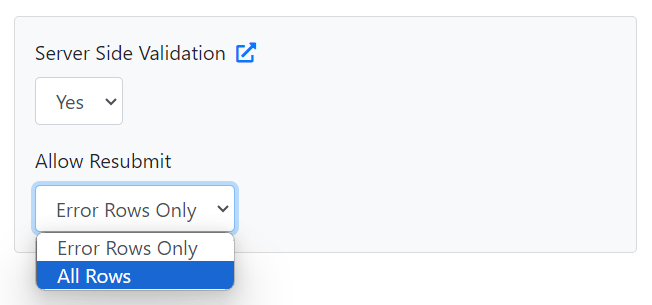
### Resubmit all rows in server-side validation
Improvements added to [Server-Side Validation](/advanced-installation/server-side-validation) functionality. To allow users to re-submit all the rows again (instead of error rows only), we have added the **All Rows** option as shown below:
### Personal plan discontinued
The \$9 Personal Plan has been discontinued. Existing subscribers to this plan will remain on their current subscription.
### API keys page
Added a new page for API keys. Each team has one common set of API and Secret keys. Only the Super Admin can generate/regenerate the keys. Admin and Tech roles can view the keys.
### Airtable personal access tokens
Updated the Airtable integration to move from the older API key based authentication to the newer Personal Access Token based authentication.
### Speed and security improvements
* Added optimizations to improve speed.
* Fixed vulnerabilities as per the external pen testing report.
### Resubmit all rows in server-side validation
Improvements added to [Server-Side Validation](/advanced-installation/server-side-validation) functionality. To allow users to re-submit all the rows again (instead of error rows only), we have added the **All Rows** option as shown below:
 ### Multiple teams
Updated the Teams feature to allow users to be part of multiple teams.
### Skip the FTP header row
Added an option to skip pushing the header row to the FTP data destination.
### SOC 2 Type 2 certification
It is official! CSVbox is now SOC 2 Type 2 certified. [Read more](https://csvbox.io/soc-2-type-2).
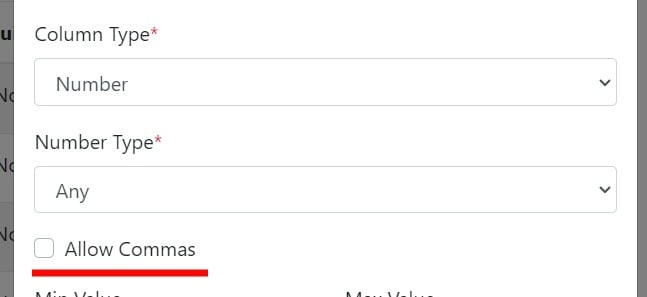
### Allow commas in Number columns
Added the **Allow Commas** option to the **Number** type column.
### Multiple teams
Updated the Teams feature to allow users to be part of multiple teams.
### Skip the FTP header row
Added an option to skip pushing the header row to the FTP data destination.
### SOC 2 Type 2 certification
It is official! CSVbox is now SOC 2 Type 2 certified. [Read more](https://csvbox.io/soc-2-type-2).
### Allow commas in Number columns
Added the **Allow Commas** option to the **Number** type column.
 ### No headers option
Added an option **No headers in the sheet** on the Header Row selection page.
### Target file name
Added the [`target_file_name`](/getting-started/2-install-code#target_file_name) option to control the name of the file that gets pushed to the end destination.
### Dynamic columns in Validation Functions
Added dynamic column support to Validation Functions.
### Validation Functions
Added [Validation Functions](/sheet-settings/validation-functions). Code your custom validation logic in JavaScript.
### Worksheet selection
Added support for [worksheet selection](/dashboard-settings/sheet-options-1#worksheet-selection) in Excel files.
### Team members
Deployed the functionality to add multiple [team members](/account/teams) to the CSVbox account.
### Max rows options
Added new options, `max_rows_allow_submit` and `max_rows_custom_message`, for [`max_rows`](/getting-started/2-install-code#max_rows) validation.
### Currency column type
Added [Currency](/dashboard-settings/validations#currency) Column Type validation.
### Raw columns object
Added the `raw_columns` object to the Import [Complete Webhook](/getting-started/3-receive-data#import-complete-webhook) and the [Data at Client](/getting-started/3-receive-data#data-on-the-client-side). This object contains all the column headers found in the raw spreadsheet file uploaded by the user.
### Dynamic sample template
Added [`sample_template_url`](/getting-started/2-install-code#sample_template_url) and [`sample_template_button_text`](/getting-started/2-install-code#sample_template_button_text) configuration options. With these, you can now configure a dynamic sample template file for each user.
### Ignored columns
Added [Ignored columns](/sheet-settings/import-steps/map-columns), which allow users to skip columns for data submission.
### Infrastructure changes and bug fixes
* Infrastructure changes
* Bug fixes
### Hide the copy-paste option
Added functionality to hide the copy-paste data option.
### Skip the invalid data confirmation
Added an option to skip the confirmation message when accepting invalid data.
### Performance improvements
* UI enhancements to improve the speed of the admin dashboard.
* Enabled multiple importers on the same page for the Bubble plugin.
* Performance improvements across all destinations.
### Row highlighting
A few UI enhancements. Now the entire row gets highlighted when there is a validation issue in any one cell.
### Private Mode
Added [Private Mode](/destinations/private-mode) for data processing.
### Server-side validation (beta)
Added [Server-Side Validation](/advanced-installation/server-side-validation) (Beta) feature.
### Danish language
Added the Danish language to the importer.
### Sequential or parallel webhooks
Added an option to select between Sequential and Parallel sending of data via webhooks. More info [here](/destinations#request-type).
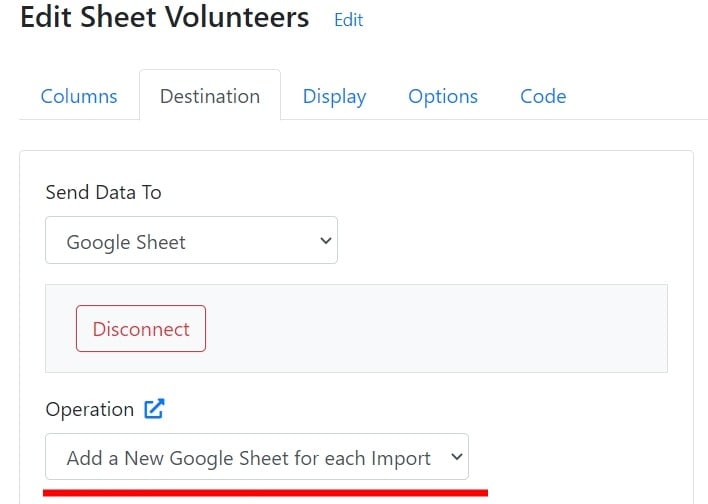
### New Google Sheets sheet per upload
Option to add a new sheet in Google Sheets for each file upload.
### No headers option
Added an option **No headers in the sheet** on the Header Row selection page.
### Target file name
Added the [`target_file_name`](/getting-started/2-install-code#target_file_name) option to control the name of the file that gets pushed to the end destination.
### Dynamic columns in Validation Functions
Added dynamic column support to Validation Functions.
### Validation Functions
Added [Validation Functions](/sheet-settings/validation-functions). Code your custom validation logic in JavaScript.
### Worksheet selection
Added support for [worksheet selection](/dashboard-settings/sheet-options-1#worksheet-selection) in Excel files.
### Team members
Deployed the functionality to add multiple [team members](/account/teams) to the CSVbox account.
### Max rows options
Added new options, `max_rows_allow_submit` and `max_rows_custom_message`, for [`max_rows`](/getting-started/2-install-code#max_rows) validation.
### Currency column type
Added [Currency](/dashboard-settings/validations#currency) Column Type validation.
### Raw columns object
Added the `raw_columns` object to the Import [Complete Webhook](/getting-started/3-receive-data#import-complete-webhook) and the [Data at Client](/getting-started/3-receive-data#data-on-the-client-side). This object contains all the column headers found in the raw spreadsheet file uploaded by the user.
### Dynamic sample template
Added [`sample_template_url`](/getting-started/2-install-code#sample_template_url) and [`sample_template_button_text`](/getting-started/2-install-code#sample_template_button_text) configuration options. With these, you can now configure a dynamic sample template file for each user.
### Ignored columns
Added [Ignored columns](/sheet-settings/import-steps/map-columns), which allow users to skip columns for data submission.
### Infrastructure changes and bug fixes
* Infrastructure changes
* Bug fixes
### Hide the copy-paste option
Added functionality to hide the copy-paste data option.
### Skip the invalid data confirmation
Added an option to skip the confirmation message when accepting invalid data.
### Performance improvements
* UI enhancements to improve the speed of the admin dashboard.
* Enabled multiple importers on the same page for the Bubble plugin.
* Performance improvements across all destinations.
### Row highlighting
A few UI enhancements. Now the entire row gets highlighted when there is a validation issue in any one cell.
### Private Mode
Added [Private Mode](/destinations/private-mode) for data processing.
### Server-side validation (beta)
Added [Server-Side Validation](/advanced-installation/server-side-validation) (Beta) feature.
### Danish language
Added the Danish language to the importer.
### Sequential or parallel webhooks
Added an option to select between Sequential and Parallel sending of data via webhooks. More info [here](/destinations#request-type).
### New Google Sheets sheet per upload
Option to add a new sheet in Google Sheets for each file upload.
 ### onLoadStart event
Added the importer event [onLoadStart](/getting-started/2-install-code#onloadstart). It gets triggered when the importer iFrame starts loading.
### Airtable upsert
Added [Upsert](/destinations#2-upsert) operation for Airtable.
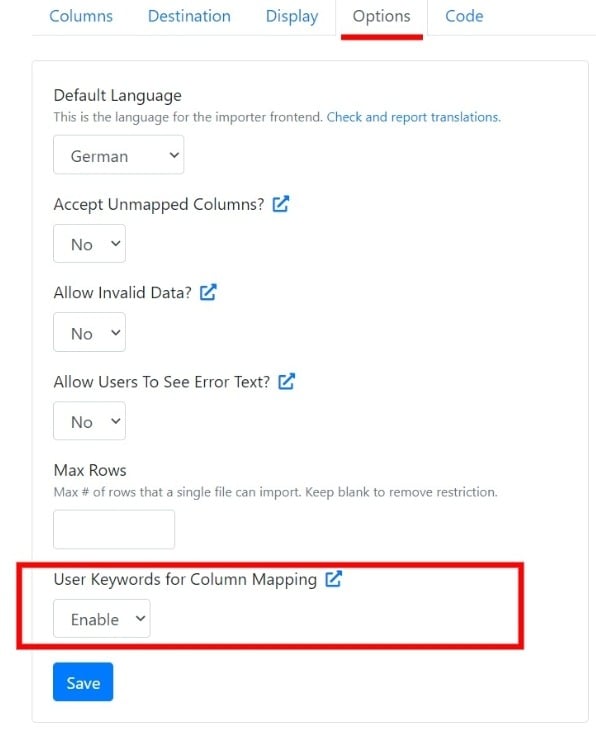
### Disable user keyword mapping
Option to disable [user keywords](/sheet-settings/columns#matching-keywords) based column mapping.
### onLoadStart event
Added the importer event [onLoadStart](/getting-started/2-install-code#onloadstart). It gets triggered when the importer iFrame starts loading.
### Airtable upsert
Added [Upsert](/destinations#2-upsert) operation for Airtable.
### Disable user keyword mapping
Option to disable [user keywords](/sheet-settings/columns#matching-keywords) based column mapping.
 ### Dynamic column position
Added the [`position`](/advanced-installation/dynamic-columns#column-position) parameter to control the display order of the dynamic columns.
### Lazy load
Added the [Lazy Load](/getting-started/2-install-code#lazy-load) option for importer initialization.
### Multi-level dependent lists
Added multiple-level List-Dependent List validations.
### Other improvements
* Added info icons on the Column Mapping page.
* Updated email validation to accept special characters.
* Fixed bugs, improved notifications, and made minor UI changes to the admin section.
### Japanese language
Added the Japanese language to the importer.
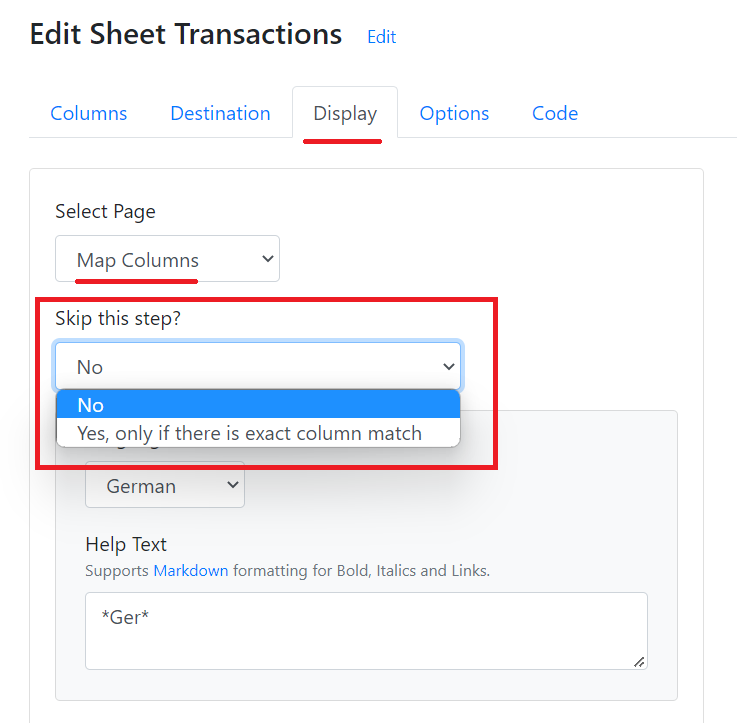
### Skip column mapping on exact match
Added an option to skip the Column Mapping screen if there is an exact match of columns.
### Dynamic column position
Added the [`position`](/advanced-installation/dynamic-columns#column-position) parameter to control the display order of the dynamic columns.
### Lazy load
Added the [Lazy Load](/getting-started/2-install-code#lazy-load) option for importer initialization.
### Multi-level dependent lists
Added multiple-level List-Dependent List validations.
### Other improvements
* Added info icons on the Column Mapping page.
* Updated email validation to accept special characters.
* Fixed bugs, improved notifications, and made minor UI changes to the admin section.
### Japanese language
Added the Japanese language to the importer.
### Skip column mapping on exact match
Added an option to skip the Column Mapping screen if there is an exact match of columns.
 ### More multi-select delimiters
Added support for delimiters such as "." and "|" for [Multi-select List](/dashboard-settings/validations#multi-select-list) and [Dynamic Multi-select List](/dashboard-settings/validations#dynamic-multi-select-list) column types.
### Slovenian language
Added the Slovenian language.
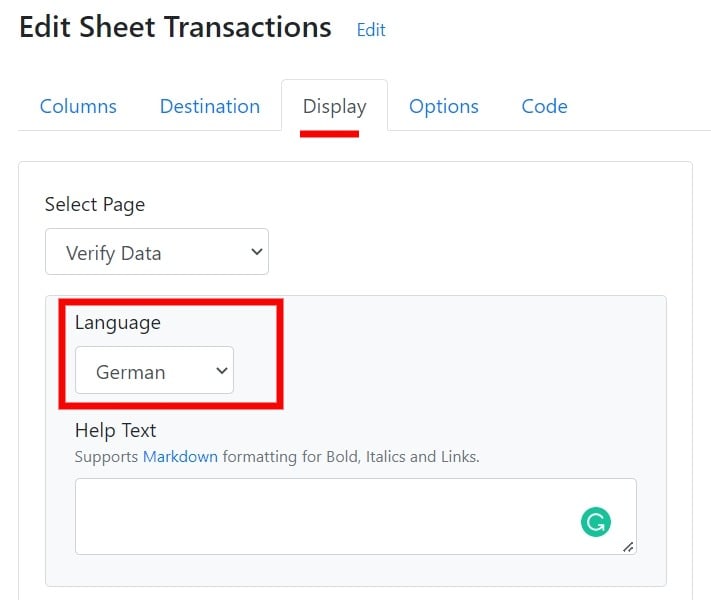
### Multilingual help text
Added the option to provide help text in multiple languages.
### More multi-select delimiters
Added support for delimiters such as "." and "|" for [Multi-select List](/dashboard-settings/validations#multi-select-list) and [Dynamic Multi-select List](/dashboard-settings/validations#dynamic-multi-select-list) column types.
### Slovenian language
Added the Slovenian language.
### Multilingual help text
Added the option to provide help text in multiple languages.
 ### Virtual Columns data variables
* `csvbox.row["total_rows"]` and `csvbox.row["row_number"]` [data variables](/sheet-settings/virtual-columns#csvboxrow) added to Virtual Columns.
* [`csvbox.virtual`](/sheet-settings/virtual-columns#csvboxvirtual) object added to Virtual Columns.
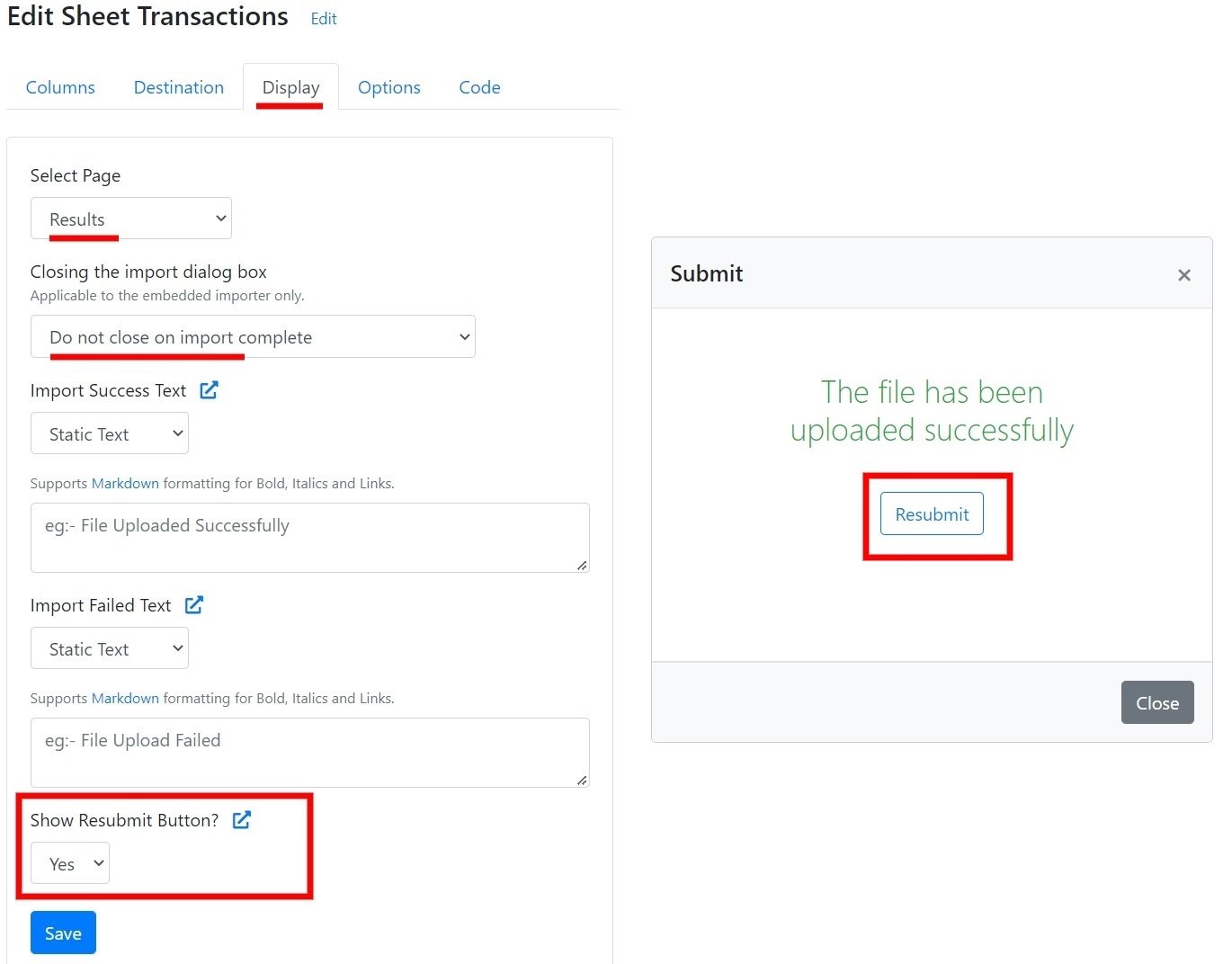
### Resubmit button
Added a [1-click Resubmit button](/dashboard-settings/sheet-options-1#resubmit-button) to trigger a new import on the recently submitted file.
### Virtual Columns data variables
* `csvbox.row["total_rows"]` and `csvbox.row["row_number"]` [data variables](/sheet-settings/virtual-columns#csvboxrow) added to Virtual Columns.
* [`csvbox.virtual`](/sheet-settings/virtual-columns#csvboxvirtual) object added to Virtual Columns.
### Resubmit button
Added a [1-click Resubmit button](/dashboard-settings/sheet-options-1#resubmit-button) to trigger a new import on the recently submitted file.
 ### Multi-select List column types
Added [Multi-select List](/dashboard-settings/validations#multi-select-list) and [Dynamic Multi-select List](/dashboard-settings/validations#dynamic-multi-select-list) column types.
### View and delete user keywords
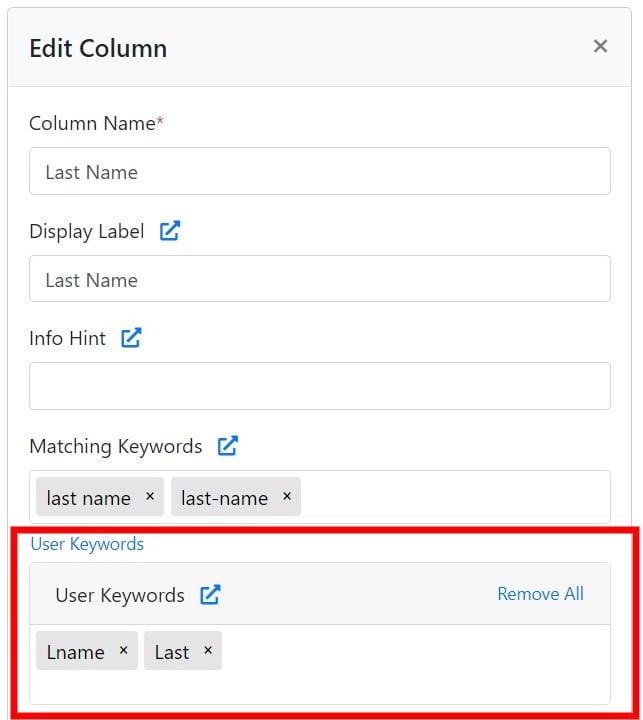
Added an option to view and delete [User Keywords](/sheet-settings/columns#matching-keywords).
### Multi-select List column types
Added [Multi-select List](/dashboard-settings/validations#multi-select-list) and [Dynamic Multi-select List](/dashboard-settings/validations#dynamic-multi-select-list) column types.
### View and delete user keywords
Added an option to view and delete [User Keywords](/sheet-settings/columns#matching-keywords).
 ### Reset All Mappings button
Added a Reset All Mappings button to make it easier for users to reset and remap the columns. This button is optional and its visibility can be controlled via the Sheet settings page.
### Italian language
Added the Italian language option for the importer frontend.
### Copy sheet settings
Added an option to Copy sheet settings to an existing sheet. The data destination config and license key remain the same in the target sheet.
### Faster SQL Server integration
Optimized SQL Server integration code to improve speed.
### Data location parameter
Added the `data_location` initialization parameter for specifying data and server location.
### Fixes and performance improvements
* Fixed UI bugs related to the `max_rows` option.
* Upgraded infrastructure and added optimizations for improved speed for the EU region.
* Improved performance for imports with many Virtual Columns.
### DPA update
Updated the [DPA](/legal/gdpr/data-processing-addendum) to add the Europe Data Residency option.
### Europe data residency
Added the option to select the Europe (Germany) location for data residency. More info [here](/dashboard-settings/sheet-options-1#server--data-location).
### Hebrew language
Added the Hebrew language for the importer frontend.
### Time column type
Added **Time** Column type validation.
### Column limit removed
The 100-column sheet restriction was removed.
### Virtual Columns
Added [Virtual Columns](/sheet-settings/virtual-columns). Create new columns by applying custom data transformation logic.
### Romanian language
Added the Romanian language option for the importer frontend.
### Disable import links
Added the [Import Link disable](/advanced-installation/import-links#activating-import-links) option.
### Import dialog size
Added an option to control [import dialog size](/dashboard-settings/sheet-options-1#importer-dialog-size).
### Decimal and integer validation
Added decimal / integer validation.
### onSubmit event in framework libraries
Updated React, Angular, and Vue.js libraries for the [onSubmit Importer event](/getting-started/2-install-code#events).
### onSubmit event
Added the [onSubmit Importer event](/getting-started/2-install-code#events).
### Default column value
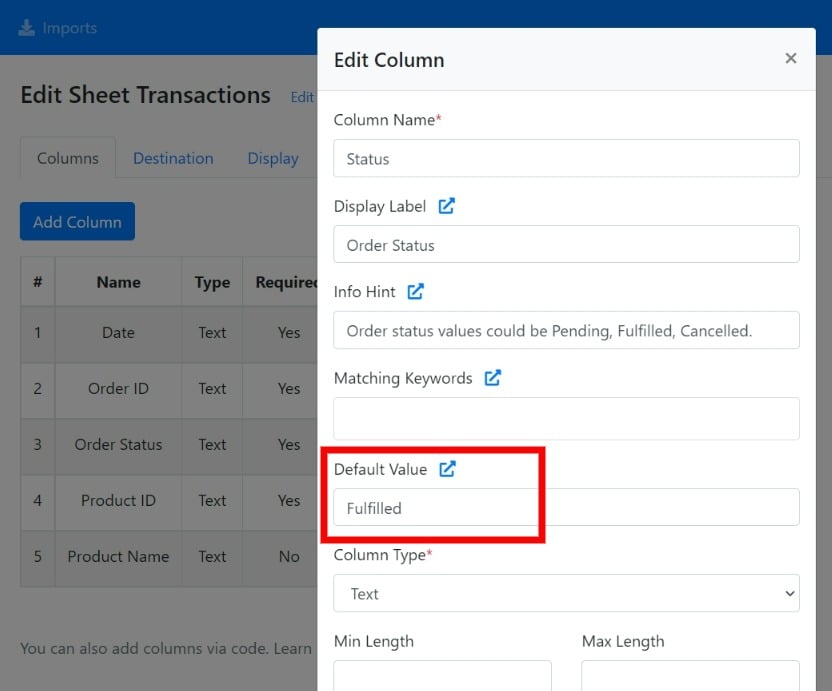
You now have the option to specify a default filler value for the column in case the incoming data is blank.
### Reset All Mappings button
Added a Reset All Mappings button to make it easier for users to reset and remap the columns. This button is optional and its visibility can be controlled via the Sheet settings page.
### Italian language
Added the Italian language option for the importer frontend.
### Copy sheet settings
Added an option to Copy sheet settings to an existing sheet. The data destination config and license key remain the same in the target sheet.
### Faster SQL Server integration
Optimized SQL Server integration code to improve speed.
### Data location parameter
Added the `data_location` initialization parameter for specifying data and server location.
### Fixes and performance improvements
* Fixed UI bugs related to the `max_rows` option.
* Upgraded infrastructure and added optimizations for improved speed for the EU region.
* Improved performance for imports with many Virtual Columns.
### DPA update
Updated the [DPA](/legal/gdpr/data-processing-addendum) to add the Europe Data Residency option.
### Europe data residency
Added the option to select the Europe (Germany) location for data residency. More info [here](/dashboard-settings/sheet-options-1#server--data-location).
### Hebrew language
Added the Hebrew language for the importer frontend.
### Time column type
Added **Time** Column type validation.
### Column limit removed
The 100-column sheet restriction was removed.
### Virtual Columns
Added [Virtual Columns](/sheet-settings/virtual-columns). Create new columns by applying custom data transformation logic.
### Romanian language
Added the Romanian language option for the importer frontend.
### Disable import links
Added the [Import Link disable](/advanced-installation/import-links#activating-import-links) option.
### Import dialog size
Added an option to control [import dialog size](/dashboard-settings/sheet-options-1#importer-dialog-size).
### Decimal and integer validation
Added decimal / integer validation.
### onSubmit event in framework libraries
Updated React, Angular, and Vue.js libraries for the [onSubmit Importer event](/getting-started/2-install-code#events).
### onSubmit event
Added the [onSubmit Importer event](/getting-started/2-install-code#events).
### Default column value
You now have the option to specify a default filler value for the column in case the incoming data is blank.
 ### Domain authorization
Added the [domain authorization](/dashboard-settings/sheet-options-1#domain-authorization) option. You can provide a list of approved *domains/sub-domains* for embedding the importer. The embedded importer works on the whitelisted domains only.
### Import complete messages
Added functionality to configure custom success or failure messages when the import completes. More info [here](/dashboard-settings/sheet-options-1#import-complete-messages).
### Dynamic columns for dependent lists
Added [dynamic column](/advanced-installation/dynamic-columns) support for [Dependent List](/dashboard-settings/validations#dependent-list) and [Dependent Dynamic List](/dashboard-settings/validations#dependent-dynamic-list) columns.
### Polish language
Added the Polish language option for the importer frontend.
### Thai language
Added the Thai language option for the importer frontend.
### Importer exit options
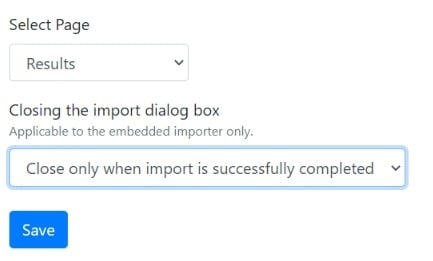
Added options for controlling the close of the importer dialog after the import is complete.
### Domain authorization
Added the [domain authorization](/dashboard-settings/sheet-options-1#domain-authorization) option. You can provide a list of approved *domains/sub-domains* for embedding the importer. The embedded importer works on the whitelisted domains only.
### Import complete messages
Added functionality to configure custom success or failure messages when the import completes. More info [here](/dashboard-settings/sheet-options-1#import-complete-messages).
### Dynamic columns for dependent lists
Added [dynamic column](/advanced-installation/dynamic-columns) support for [Dependent List](/dashboard-settings/validations#dependent-list) and [Dependent Dynamic List](/dashboard-settings/validations#dependent-dynamic-list) columns.
### Polish language
Added the Polish language option for the importer frontend.
### Thai language
Added the Thai language option for the importer frontend.
### Importer exit options
Added options for controlling the close of the importer dialog after the import is complete.
 ### Dependent Dynamic List columns
Added [Dependent Dynamic List Columns](/dashboard-settings/validations#dependent-dynamic-list).
### Column mappings object
Added the `column_mappings` object to the [import complete webhook](/getting-started/3-receive-data#import-complete-webhook) and the [callback function](/getting-started/2-install-code#callback-function). The `column_mappings` object contains the user-defined mappings between the columns of the sheet (template) and columns in the uploaded CSV file.
### Import ID column
Added the **Import ID** column in the table on the Imports page of the CSVbox dashboard.
### Multiple date validation for dynamic columns
The dynamic columns now support multiple date validation.
### Export button
Added an **Export** button that downloads the validation errors and row data in an Excel sheet. More info [here](/dashboard-settings/sheet-options-1#export-button).
### Truncated row count
Updated the importer UI to show the truncated row count.
### Max rows
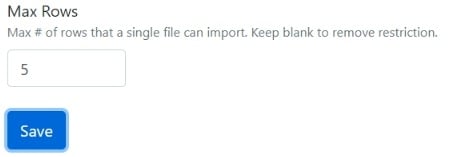
Added the Max Rows option to the importer dashboard. It limits the number of rows per import.
### Dependent Dynamic List columns
Added [Dependent Dynamic List Columns](/dashboard-settings/validations#dependent-dynamic-list).
### Column mappings object
Added the `column_mappings` object to the [import complete webhook](/getting-started/3-receive-data#import-complete-webhook) and the [callback function](/getting-started/2-install-code#callback-function). The `column_mappings` object contains the user-defined mappings between the columns of the sheet (template) and columns in the uploaded CSV file.
### Import ID column
Added the **Import ID** column in the table on the Imports page of the CSVbox dashboard.
### Multiple date validation for dynamic columns
The dynamic columns now support multiple date validation.
### Export button
Added an **Export** button that downloads the validation errors and row data in an Excel sheet. More info [here](/dashboard-settings/sheet-options-1#export-button).
### Truncated row count
Updated the importer UI to show the truncated row count.
### Max rows
Added the Max Rows option to the importer dashboard. It limits the number of rows per import.
 ### Phone number validation
Added phone number validation based on the [libphonenumber.js library](https://catamphetamine.gitlab.io/libphonenumber-js/).
### Import modal UI changes
Minor UI changes to the import modal. Changes include:
* The importer modal is now full screen across all devices.
* The column mapping table & validation error text are center-aligned for better visibility.
### Logo and custom font styling
New styling options added: upload logo and custom fonts.
### Arabic language
Added the Arabic language (ltr) support for the importer frontend.
### Show import fail messages
Added an option to allow displaying the import fail error messages to the end-user.
### Primary color theme
Added the **Primary Color** custom theme option. You can stylize the importer with the primary color of your brand. More styling options coming soon.
### Custom user attributes in Dynamic List requests
The importer attaches the [custom user attributes](/getting-started/2-install-code#referencing-the-user) as query parameters to the [Dynamic List](/dashboard-settings/validations#dynamic-list) API request. A `csvbox_` prefix is added to the custom user attribute query parameters. This helps you identify the users/environment and return a relevant list of values.
### Database upsert
Added the **Upsert** operation to MySQL, PostgreSQL, and MS SQL data destinations. Instead of directly inserting the file data into the databases, the importer first checks if the record exists. If the record exists, then the row is updated. Only if the record does not exist is a new row added.
### Dynamic List column type
Added the [Dynamic List](/dashboard-settings/validations#dynamic-list) column type to accept valid list values via API, real-time.
### Select Header Row display options
New display options for the **Select Header Row** page of the importer.
### Phone number validation
Added phone number validation based on the [libphonenumber.js library](https://catamphetamine.gitlab.io/libphonenumber-js/).
### Import modal UI changes
Minor UI changes to the import modal. Changes include:
* The importer modal is now full screen across all devices.
* The column mapping table & validation error text are center-aligned for better visibility.
### Logo and custom font styling
New styling options added: upload logo and custom fonts.
### Arabic language
Added the Arabic language (ltr) support for the importer frontend.
### Show import fail messages
Added an option to allow displaying the import fail error messages to the end-user.
### Primary color theme
Added the **Primary Color** custom theme option. You can stylize the importer with the primary color of your brand. More styling options coming soon.
### Custom user attributes in Dynamic List requests
The importer attaches the [custom user attributes](/getting-started/2-install-code#referencing-the-user) as query parameters to the [Dynamic List](/dashboard-settings/validations#dynamic-list) API request. A `csvbox_` prefix is added to the custom user attribute query parameters. This helps you identify the users/environment and return a relevant list of values.
### Database upsert
Added the **Upsert** operation to MySQL, PostgreSQL, and MS SQL data destinations. Instead of directly inserting the file data into the databases, the importer first checks if the record exists. If the record exists, then the row is updated. Only if the record does not exist is a new row added.
### Dynamic List column type
Added the [Dynamic List](/dashboard-settings/validations#dynamic-list) column type to accept valid list values via API, real-time.
### Select Header Row display options
New display options for the **Select Header Row** page of the importer.
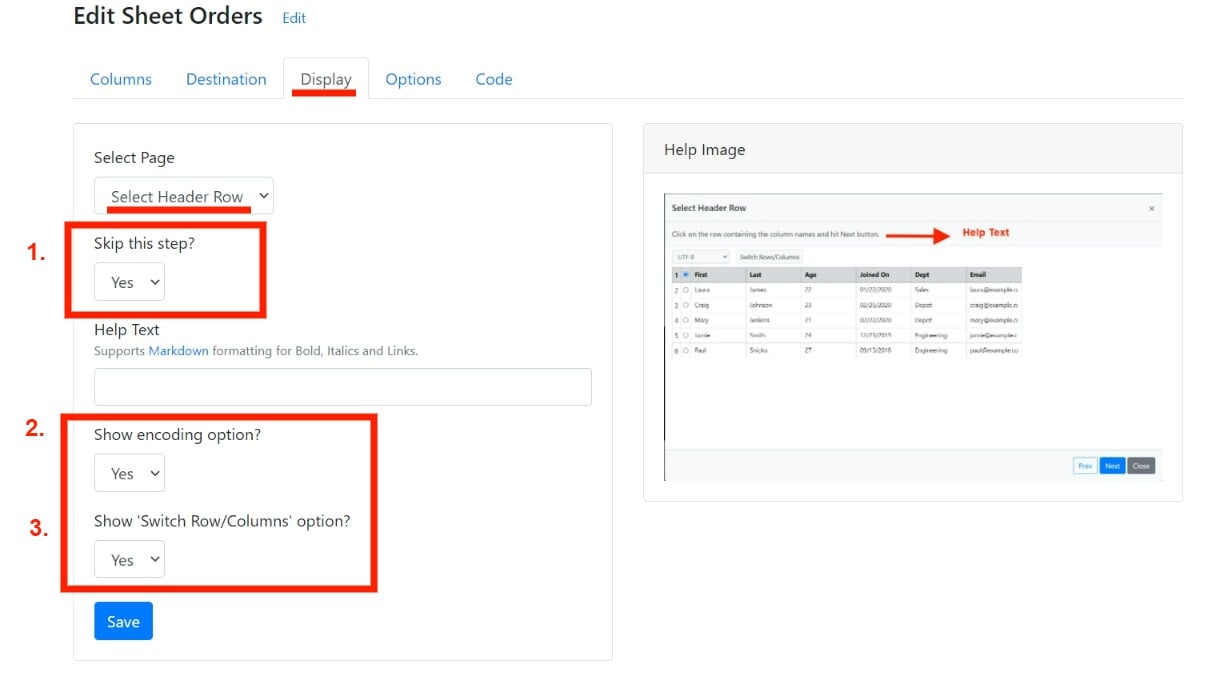 1. **Skip this step?**: Hide/Show the **Select header row** page to the users.
2. **Show encoding**: Hide/Show the character set selection list to the users.
3. **Switch Row/Columns**: Hide/Show the option to switch rows and columns to the users.
These settings help to remove the non-essential options from the importer and make the user experience cleaner.
### Delete account
Added the option (**DELETE** button on the Accounts page) to delete and close down the CSVbox account permanently.
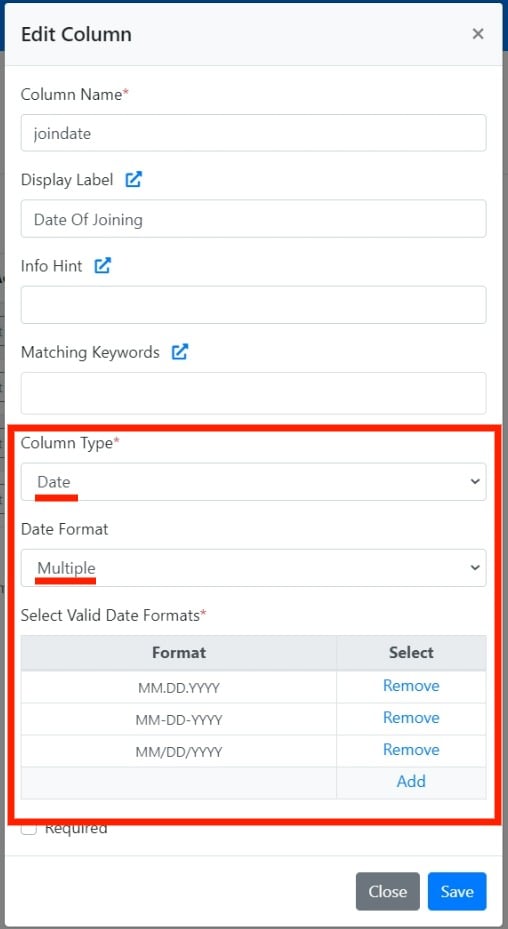
### Multiple date formats
Added the **Multiple** option to Date Type columns. With this, you can provide multiple date formats that are allowed for the incoming data.
1. **Skip this step?**: Hide/Show the **Select header row** page to the users.
2. **Show encoding**: Hide/Show the character set selection list to the users.
3. **Switch Row/Columns**: Hide/Show the option to switch rows and columns to the users.
These settings help to remove the non-essential options from the importer and make the user experience cleaner.
### Delete account
Added the option (**DELETE** button on the Accounts page) to delete and close down the CSVbox account permanently.
### Multiple date formats
Added the **Multiple** option to Date Type columns. With this, you can provide multiple date formats that are allowed for the incoming data.
 ### JSON data in the callback function
Added the option to receive the CSV data in JSON format in the callback function. More info [here](/getting-started/3-receive-data#data-on-the-client-side).
### Notion destination
Added [Notion Data Destination](/destinations/notion).
### Large file fix for the REST File API
Fixed a bug for very large file uploads with [REST File API](/advanced-installation/rest-file-api).
### SQL Server destination
**Added**: [SQL Server Data Destination](/destinations#sql-server).
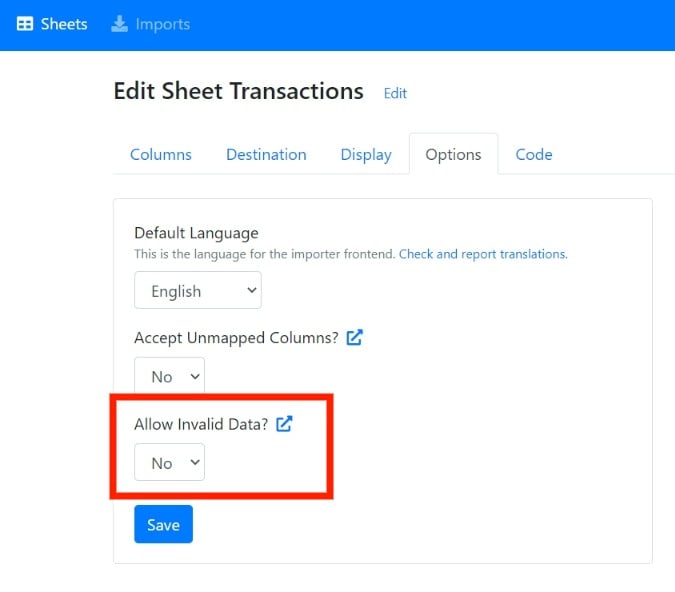
### Allow invalid option
**Added**: [`allow_invalid` option](/getting-started/2-install-code#allow_invalid).
### JSON data in the callback function
Added the option to receive the CSV data in JSON format in the callback function. More info [here](/getting-started/3-receive-data#data-on-the-client-side).
### Notion destination
Added [Notion Data Destination](/destinations/notion).
### Large file fix for the REST File API
Fixed a bug for very large file uploads with [REST File API](/advanced-installation/rest-file-api).
### SQL Server destination
**Added**: [SQL Server Data Destination](/destinations#sql-server).
### Allow invalid option
**Added**: [`allow_invalid` option](/getting-started/2-install-code#allow_invalid).
 ### Help text for each page
**Added**: Ability to add help texts for each page (header selection, column mapping, data validation) on the importer.
### Added
* Yearly pricing plans
* [REST File API](/advanced-installation/rest-file-api) beta
* New [importer events](/getting-started/2-install-code#events) (onReady, onClose)
* [`request_headers`](/getting-started/2-install-code#request_headers) option to send headers at run-time
* PATCH request type
* `total_rows` parameter to the [API output](/getting-started/3-receive-data#sample-response).
* `original_filename` parameter to the [import complete webhook](/getting-started/3-receive-data#import-complete-webhook) and importer [callback function](/getting-started/2-install-code#callback-function).
### Updated
* Fixed an issue related to freezing of the importer
* Updated the code from Laravel 8 to Laravel 9
* Added new layers of database security
* Fixed an issue related to the downloading of the template files
* Added custom attribute mapping for Airtable
* UI enhancements
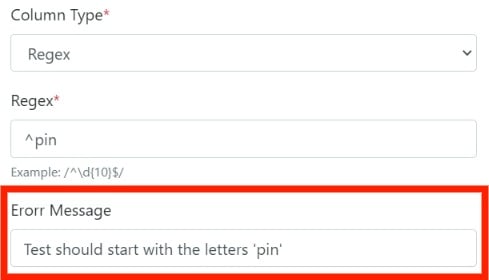
### Custom regex validation message
**Added**: Custom message for regex validation.
### Help text for each page
**Added**: Ability to add help texts for each page (header selection, column mapping, data validation) on the importer.
### Added
* Yearly pricing plans
* [REST File API](/advanced-installation/rest-file-api) beta
* New [importer events](/getting-started/2-install-code#events) (onReady, onClose)
* [`request_headers`](/getting-started/2-install-code#request_headers) option to send headers at run-time
* PATCH request type
* `total_rows` parameter to the [API output](/getting-started/3-receive-data#sample-response).
* `original_filename` parameter to the [import complete webhook](/getting-started/3-receive-data#import-complete-webhook) and importer [callback function](/getting-started/2-install-code#callback-function).
### Updated
* Fixed an issue related to freezing of the importer
* Updated the code from Laravel 8 to Laravel 9
* Added new layers of database security
* Fixed an issue related to the downloading of the template files
* Added custom attribute mapping for Airtable
* UI enhancements
### Custom regex validation message
**Added**: Custom message for regex validation.
 ### Portuguese language
**Added**: Portuguese language support for the importer frontend.
### Language option
**Added**: [`language` sheet option](/getting-started/2-install-code#options) to select the frontend language while initializing the importer.
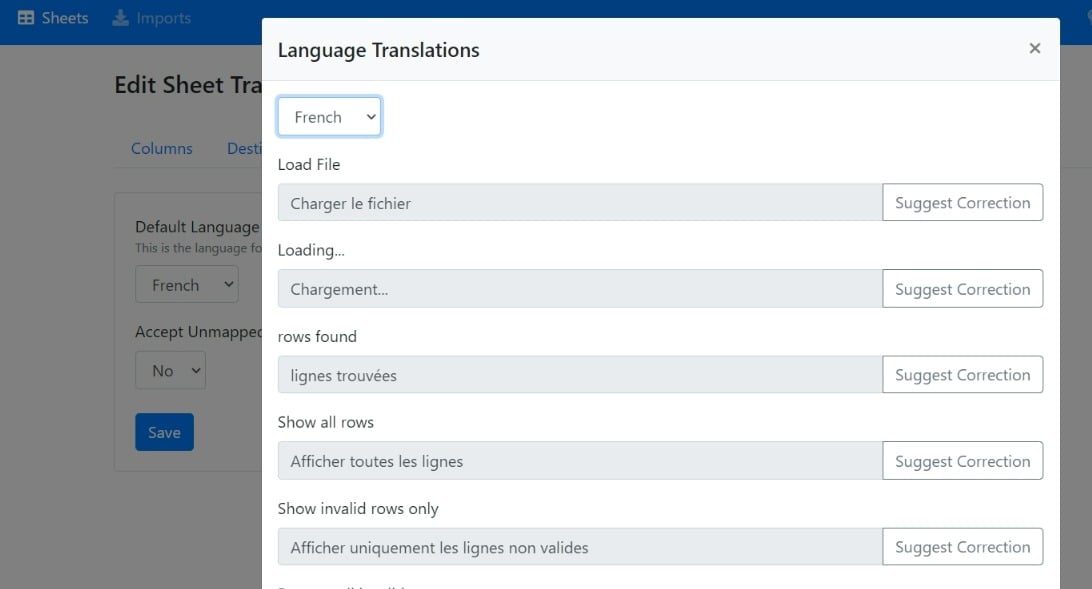
### Translation suggestions
**Updated**: You can now view the translated texts for all supported languages and submit suggestions for changes.
### Portuguese language
**Added**: Portuguese language support for the importer frontend.
### Language option
**Added**: [`language` sheet option](/getting-started/2-install-code#options) to select the frontend language while initializing the importer.
### Translation suggestions
**Updated**: You can now view the translated texts for all supported languages and submit suggestions for changes.
 ### Dutch language
**Added**: Dutch language support for the importer frontend.
### Unmapped columns
**Added**: [Unmapped Columns](/sheet-settings/import-steps/map-columns), allowing users to submit columns not included in the sheet template.
### FTP destination
**Added**: [FTP Data Destination](/destinations#ftp-server).
### Header row selection
**Added**: Header row selection step in the importer.
### Importer internationalization
**Added**: Importer internationalization. The importer now supports German, French, and Spanish languages.
### Max rows option
**Added**: [`max_rows`](/getting-started/2-install-code#options) config option to restrict the number of rows uploaded in a single sheet.
### Zapier destination
**Added**: [Zapier Data Destination](/destinations/zapier).
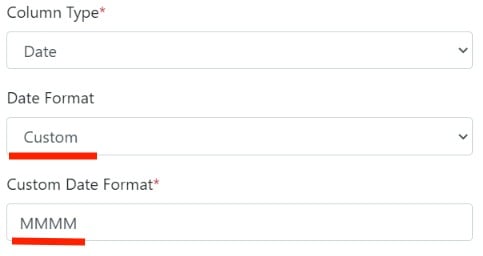
### Custom date validation
**Updated**: Included the **Custom** validation option for Date Type columns. Date formatting options available [here](/dashboard-settings/validations#date).
### Dutch language
**Added**: Dutch language support for the importer frontend.
### Unmapped columns
**Added**: [Unmapped Columns](/sheet-settings/import-steps/map-columns), allowing users to submit columns not included in the sheet template.
### FTP destination
**Added**: [FTP Data Destination](/destinations#ftp-server).
### Header row selection
**Added**: Header row selection step in the importer.
### Importer internationalization
**Added**: Importer internationalization. The importer now supports German, French, and Spanish languages.
### Max rows option
**Added**: [`max_rows`](/getting-started/2-install-code#options) config option to restrict the number of rows uploaded in a single sheet.
### Zapier destination
**Added**: [Zapier Data Destination](/destinations/zapier).
### Custom date validation
**Updated**: Included the **Custom** validation option for Date Type columns. Date formatting options available [here](/dashboard-settings/validations#date).
 This documentation is built and hosted on [Mintlify](https://mintlify.com), a developer documentation platform.