> ## Documentation Index
> Fetch the complete documentation index at: https://help.csvbox.io/llms.txt
> Use this file to discover all available pages before exploring further.
# Bulk Add Columns
> Bulk add columns to a new sheet by providing the column info in a CSV file.
Instead of creating columns one at a time, you can add them to a new sheet in bulk from a CSV file. CSVbox offers two methods to do this.
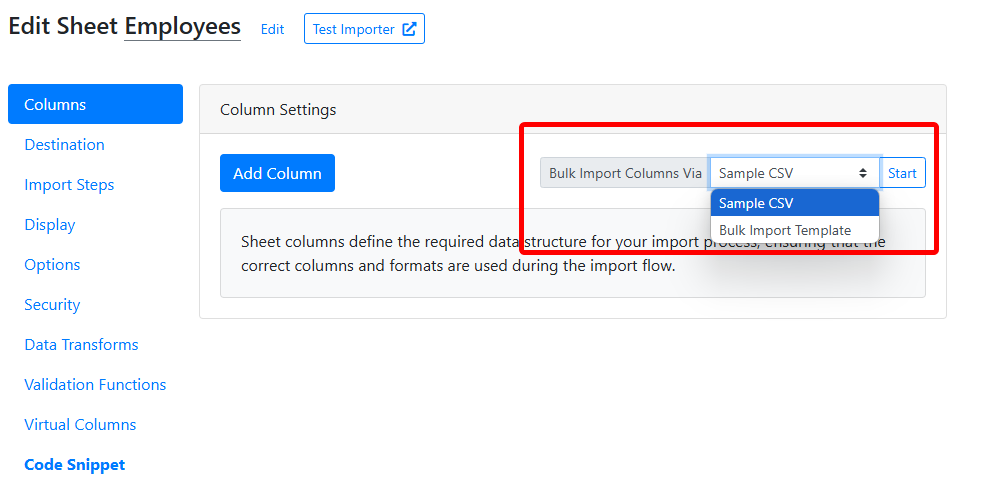 ## Using a sample CSV file
Upload any sample CSV or Excel file you already have. CSVbox automatically extracts the column headers from your file and creates corresponding columns in your sheet, and AI attempts to detect column types based on the data. You can always review and modify the columns afterward.
## Using the bulk import template
For more control over column setup, use the **predefined CSV template**. Download the template, fill it with column info, and upload it back. Columns are created based on the data you provide.
The template supports the following fields:
| Field | Description | Required |
| - | - | - |
| [Column Name](/sheet-settings/columns#column-name) | Internal name of the column | Yes |
| [Display Name](/sheet-settings/columns#display-label) | Display label for end users | Optional |
| [Info Hint](/sheet-settings/columns#info-hint) | Tooltip/help text for users | Optional |
| [Column Type](/sheet-settings/columns#column-type) | Type of the field (e.g. Text, Number, Date) | Optional |
| [Is Required](/sheet-settings/columns#required) | Should this field be mandatory? (Yes/No) | Optional |
| [Keywords](/sheet-settings/columns#matching-keywords) | Tags to help with auto-mapping | Optional |
Download the CSV template.
This documentation is built and hosted on [Mintlify](https://mintlify.com), a developer documentation platform.
## Using a sample CSV file
Upload any sample CSV or Excel file you already have. CSVbox automatically extracts the column headers from your file and creates corresponding columns in your sheet, and AI attempts to detect column types based on the data. You can always review and modify the columns afterward.
## Using the bulk import template
For more control over column setup, use the **predefined CSV template**. Download the template, fill it with column info, and upload it back. Columns are created based on the data you provide.
The template supports the following fields:
| Field | Description | Required |
| - | - | - |
| [Column Name](/sheet-settings/columns#column-name) | Internal name of the column | Yes |
| [Display Name](/sheet-settings/columns#display-label) | Display label for end users | Optional |
| [Info Hint](/sheet-settings/columns#info-hint) | Tooltip/help text for users | Optional |
| [Column Type](/sheet-settings/columns#column-type) | Type of the field (e.g. Text, Number, Date) | Optional |
| [Is Required](/sheet-settings/columns#required) | Should this field be mandatory? (Yes/No) | Optional |
| [Keywords](/sheet-settings/columns#matching-keywords) | Tags to help with auto-mapping | Optional |
Download the CSV template.
This documentation is built and hosted on [Mintlify](https://mintlify.com), a developer documentation platform.