> ## Documentation Index
> Fetch the complete documentation index at: https://help.csvbox.io/llms.txt
> Use this file to discover all available pages before exploring further.
# SQL Server
> Import CSV files and Excel sheets directly into your SQL Server tables.
Import CSV files and Excel sheets directly into your SQL Server tables.
Select **SQL Server Database** as the destination type.
Connect your SQL Server database by providing the credentials.
Specify the table name where you want the data to be pushed.
Click **Test Connection**.
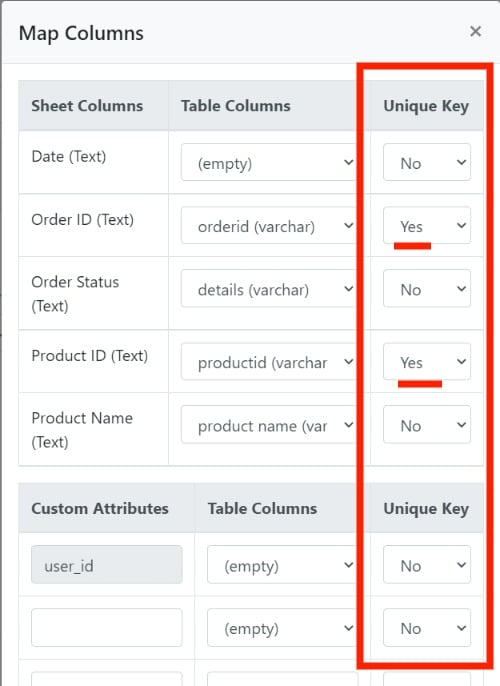
If the connection is successful, click **Map Columns** and match the sheet template columns to the SQL Server table columns. You can also map custom attributes to table columns.
Select one of the following 2 operations:
* **Insert**: the importer always pushes the incoming CSV data as new records in the database.
* **Upsert**: the importer checks whether the record exists in the database. If it exists, it's updated with the incoming data from the CSV. If it doesn't, a new record is inserted. The record check is based on the index keys specified in the mapping modal.
 The **Upsert** operation is significantly slower than the **Insert** operation. With **Insert**, records can be pushed in chunks, whereas **Upsert** processes only one record at a time and requires multiple queries.
Boolean columns that use [Display as checkbox](/dashboard-settings/validations#display-as-checkbox) are pushed as `true` or `false`, which SQL Server accepts for boolean columns.
This documentation is built and hosted on [Mintlify](https://mintlify.com), a developer documentation platform.
The **Upsert** operation is significantly slower than the **Insert** operation. With **Insert**, records can be pushed in chunks, whereas **Upsert** processes only one record at a time and requires multiple queries.
Boolean columns that use [Display as checkbox](/dashboard-settings/validations#display-as-checkbox) are pushed as `true` or `false`, which SQL Server accepts for boolean columns.
This documentation is built and hosted on [Mintlify](https://mintlify.com), a developer documentation platform.