> ## Documentation Index
> Fetch the complete documentation index at: https://help.csvbox.io/llms.txt
> Use this file to discover all available pages before exploring further.
# Receive Data
> Receive validated, ready-to-use spreadsheet data in your app through your destination, a webhook, or the client-side callback.
Once the code is installed, your users can submit their files through the CSVbox importer. The raw files they upload are available on the **Import** page of your dashboard. CSVbox also pushes the data to your app according to the [destination](/destinations) type configured for your sheet. See the [sample response](#sample-response) below for the payload format.
## Sample response
This sample JSON response is sent to an API/webhook destination:
```json theme={null}
[
{
"import_id": 79418895,
"sheet_id": 55,
"sheet_name": "Products",
"row_number": 1,
"total_rows": 1009,
"env_name": "default",
"original_filename": "products01_24.csv",
"row_data": {
"Name": "TP-Link TL-WN822N Wireless N300 High Gain USB Adapter",
"SKU": "AS-100221",
"Price": "33.00",
"Quantity": "3",
"Image URL": "https://cdn.shopify.com/s/files/1/1491/9536/products/31jJOj1DS5L_070b4893-b7af-482f-8a15-d40f5e06760d.jpg?v=1521803806"
},
"custom_fields": {
"user_id": "1002"
}
},
{
"import_id": 79418895,
"sheet_id": 55,
"sheet_name": "Products",
"row_number": 2,
"total_rows": 1009,
"env_name": "default",
"original_filename": "products01_24.csv",
"row_data":{
"Name": "EPower Technology EP-600PM Power Supply 600W ATX12V 2.3 Single 120mm Cooling Fan Bare",
"SKU": "AS-103824",
"Price": "95.35",
"Quantity": "8",
"Image URL": "https://cdn.shopify.com/s/files/1/1491/9536/products/71pRC5VjF-L_8f840eb9-6a47-407f-999c-490f7814159d.jpg?v=1521803806"
},
"custom_fields": {
"user_id": "1002"
}
},
]
```
All import data and raw files are retained for one month. You can also choose to bypass storing the files in our data store.
## Import complete webhook
Optionally, subscribe to the import complete event webhook on the sheet settings page. This webhook fires when CSVbox completes the import process for any user. Here is an example of the JSON that could be sent to your webhook endpoint:
```json theme={null}
{
"import_id": 79418895,
"sheet_id": 575,
"sheet_name": "Products Import",
"env_name": "default",
"original_filename": "products01_24.csv",
"destination_type": "webhook",
"row_count": 100,
"row_success": 98,
"row_fail": 2,
"import_status": "Partial",
"import_starttime": 87987897897,
"import_endtime": 90890890809,
"original_filename": "example-01.csv",
"raw_file": "https://file-download-link",
"custom_fields": {
"user_id": "Z1001"
},
"raw_columns": [
"Name", "Product SKU", "Origin Date", "Sale Price", "Inventory", "Img", "Notes"
],
"column_mappings": [
{ "Name": "Name" },
{ "SKU": "Product SKU" },
{ "Price": "Sale Price" },
{ "Quantity": "Inventory"},
{ "Image URL": "Img"}
]
}
```
## Data on the client side
You can also receive the entire CSV data in JSON format inside the `data` object of the [`callback`](/getting-started/2-install-code#callback-function) function.
To receive the CSV data in the callback function, activate this option on the sheet **Destination** page.
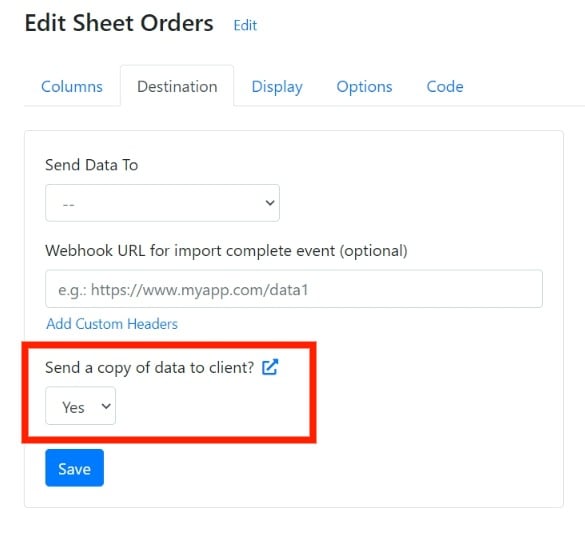 You then receive the JSON data in the `rows` property of the `data` object. For example:
```json theme={null}
{
"import_id": 79418895,
"sheet_id": 575,
"sheet_name": "Products Import",
"destination_type": "webhook",
"env_name": "default",
"original_filename": "products01_24.csv",
"row_count": 2,
"row_success": 2,
"row_fail": 0,
"import_status": "Success",
"import_starttime": 87987897897,
"import_endtime": 90890890809,
"raw_file": "https://file-download-link",
"custom_fields": {
"user_id": "Z1001"
},
"column_mappings": [
{ "Name": "Name" },
{ "SKU": "Product SKU" },
{ "Price": "Sale Price" },
{ "Quantity": "Inventory"},
{ "Image URL": "Img"},
{ "Barcode": "Barcode"},
{ "Tags": "Attributes"}
],
"raw_columns": [
"Name", "Product SKU", "Origin Date", "Sale Price", "Inventory", "Img", "Notes"
],
"rows": [
{
"Name": "Nike Shoes Greenhorn",
"SKU": "NSGH",
"Price": "195.35",
"Quantity": "2",
"_dynamic_data": {
"inventory": "11",
"origin": "uk"
},
"_unmapped_data": {
"Barcode": "2748937411",
"Tags": "green"
}
},
{
"Name": "Nike Shoes Airflow",
"SKU": "NSAF",
"Price": "295.35",
"Quantity": "1",
"_dynamic_data": {
"inventory": "2",
"origin": "uk"
},
"_unmapped_data": {
"Barcode": "5648937421",
"Tags": "blue"
}
}
]
}
```
## Next steps
Choose where CSVbox sends the imported data.
Review the importer options, events, and callback function.
This documentation is built and hosted on [Mintlify](https://mintlify.com), a developer documentation platform.
You then receive the JSON data in the `rows` property of the `data` object. For example:
```json theme={null}
{
"import_id": 79418895,
"sheet_id": 575,
"sheet_name": "Products Import",
"destination_type": "webhook",
"env_name": "default",
"original_filename": "products01_24.csv",
"row_count": 2,
"row_success": 2,
"row_fail": 0,
"import_status": "Success",
"import_starttime": 87987897897,
"import_endtime": 90890890809,
"raw_file": "https://file-download-link",
"custom_fields": {
"user_id": "Z1001"
},
"column_mappings": [
{ "Name": "Name" },
{ "SKU": "Product SKU" },
{ "Price": "Sale Price" },
{ "Quantity": "Inventory"},
{ "Image URL": "Img"},
{ "Barcode": "Barcode"},
{ "Tags": "Attributes"}
],
"raw_columns": [
"Name", "Product SKU", "Origin Date", "Sale Price", "Inventory", "Img", "Notes"
],
"rows": [
{
"Name": "Nike Shoes Greenhorn",
"SKU": "NSGH",
"Price": "195.35",
"Quantity": "2",
"_dynamic_data": {
"inventory": "11",
"origin": "uk"
},
"_unmapped_data": {
"Barcode": "2748937411",
"Tags": "green"
}
},
{
"Name": "Nike Shoes Airflow",
"SKU": "NSAF",
"Price": "295.35",
"Quantity": "1",
"_dynamic_data": {
"inventory": "2",
"origin": "uk"
},
"_unmapped_data": {
"Barcode": "5648937421",
"Tags": "blue"
}
}
]
}
```
## Next steps
Choose where CSVbox sends the imported data.
Review the importer options, events, and callback function.
This documentation is built and hosted on [Mintlify](https://mintlify.com), a developer documentation platform.